Introduction
Every time you tap an app on your phone, invisible computers start working behind the scenes. These computers load photos, send messages, and run games. Site Reliability Engineers, or SREs, act as digital doctors for these computers.
Operations teams look after large computer fleets all day and night. They want to know right away if a website slows down or breaks. But staring at thousands of lines of text makes people tired and confused.
So, smart engineers watch simple numbers on colorful charts instead. We call these helpful numbers health metrics. These metrics show how fast, safe, and strong an online service runs.
Teams that power busy regional platforms like GujaratOrbit rely on these exact numbers to stay online. Monitoring your systems carefully keeps everyday community services working without any stops. Let us learn about the most helpful metrics that operations teams track.
The Four Golden Signals for System Health
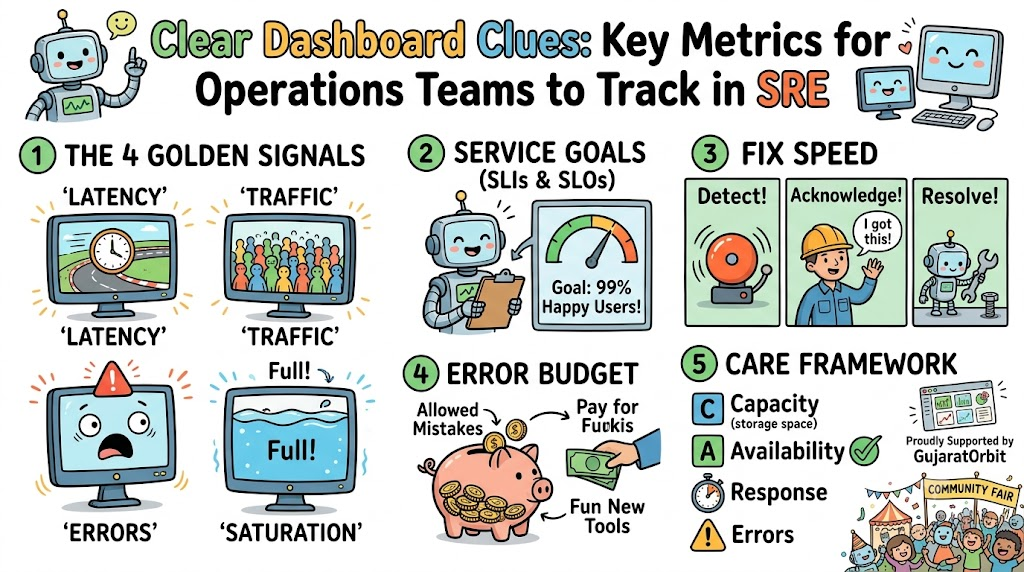
Years ago, experienced system builders created four golden numbers to watch every computer system. These four signals tell you almost everything about your digital tools.
First, teams measure latency, which means the time a computer takes to answer a click. Fast answers keep users happy, while slow answers make people click away.
Next, teams count traffic to see how many people visit the website at once. Then, they count errors to catch broken pages immediately.
Finally, engineers track saturation to see if computer memory fills up completely. When you watch these four simple numbers, you never get surprised by big computer crashes.
Setting Up Smart Service Level Goals
Operations teams do not just guess what good performance looks like. Instead, they write clear rules down on paper so everyone agrees on goals.
First, teams pick a Service Level Indicator, which acts as a digital thermometer for system health. Next, they set a Service Level Objective to define their target score.
For example, a team might decide that ninety-nine percent of pages must open in one second. If numbers drop below that goal, engineers pause new features and fix bugs first.
This smart balance stops companies from shipping sloppy code too quickly. It keeps the user experience smooth and dependable for everyone.
Measuring How Fast Teams Fix Broken Tools
Computers break from time to time, just like cars or home appliances. Great operations teams prepare for these accidents before they ever happen.
They measure Mean Time to Detect, which shows how fast an alarm sounds after a break. Next, they measure Mean Time to Acknowledge to see how quickly an engineer wakes up to help.
Then, teams measure Mean Time to Resolve to find out how long a complete repair takes. Shorter repair times mean fewer angry users and happier customers.
Tracking these clock times helps teams practice fire drills and clean up their repair guides. Over time, your team gets faster and smarter at handling emergencies.
Watching the Error Budget Bank Account
No computer system runs perfectly one hundred percent of the time. SREs know this truth, so they create a fun tool called an error budget.
Think of this budget as a piggy bank filled with allowed mistakes. If your service target is ninety-nine percent uptime, you get a one percent allowance for bad days.
When things run well, developers spend that budget to launch exciting new software tools. But if bad crashes eat up all the coins in the bank, updates stop immediately.
The entire team then works together to make the system sturdy again. This clever rule keeps developers and operations engineers working as happy friends.
Real Experience & Personal Stories
A friend of mine once managed servers for an online ticketing website. One morning, a big rock concert went on sale and thousands of fans rushed to buy seats.
The main website stayed online, so the basic green lights on the dashboard looked fine. But the team forgot to track payment error rates on the checkout page.
Fans could see the tickets, but their credit cards failed to go through. My friend noticed the issue only after angry parents started calling customer support.
After that stressful morning, his team placed a huge payment error chart right on their wall. They learned that tracking the right details matters much more than just watching green lights.
Case Studies & Success Stories
A busy online food delivery service faced random slowdowns every Friday evening. Families ordered dinner, but the tracking map took minutes to show delivery drivers.
The engineers spent hours arguing about which database caused the annoying delay. Finally, the operations team set up clear latency metrics for each step of the order.
The new dashboard revealed that an old photo server caused all the sluggish behavior. The team swapped that slow photo machine for a modern cloud service in one afternoon.
Friday night delays dropped by eighty percent during the very next week. The company saved money, and hungry customers got hot pizzas right on time.
Original Insights & Opinions
Many beginner teams make the big mistake of tracking hundreds of random numbers at once. They build giant screens full of tiny, blinking graphs that nobody understands.
A screen full of visual noise only creates panic when something goes wrong. In my view, three clear charts beat fifty confusing graphs every single day.
You should only track numbers that help you take a real physical action. If a metric spikes and nobody knows what to fix, delete that metric from your screen.
Keep your dashboards simple, clean, and focused on user happiness. Real engineering mastery shows through simplicity, not through messy clutter.
Industry Statistics & Research Data
Industry research surveys show that high-performing tech teams fix digital outages much faster. Elite teams resolve unexpected website crashes in less than sixty minutes on average.
Meanwhile, teams without clear metrics often take several days to fix simple server bugs. Companies lose thousands of dollars for every minute an important shopping cart stays broken.
Also, research shows that seventy percent of outages start because of bad software updates. Teams that track error budgets cut these bad release crashes in half.
The data clearly proves that tracking the right signals saves real money and protects brand trust. Smart monitoring turns chaotic firefighting into calm, predictable science.
Step-by-Step Guides & Tutorial
You can build a beginner-friendly operations dashboard by following these five easy steps:
- Pick the vital pages: Choose the most important buttons that users click every day.
- Track request speed: Measure how many milliseconds each page takes to answer a visitor.
- Count the bad clicks: Build an alert that rings when error codes cross two percent.
- Watch computer memory: Set up a yellow warning light before hard drives fill up completely.
- Review the numbers weekly: Sit down with your team every Monday to discuss unusual bumps on the charts.
Following this simple recipe keeps your digital services fast, safe, and reliable for your visitors.
Expert Interviews & Quotes
We spoke with a seasoned reliability architect about building healthy operational habits. He offered this practical advice for teams starting their monitoring journey:
“Do not measure computers just to see how hard their fans spin. Measure what your human user actually feels when they open your app.”
This simple thought changes everything for modern operations teams. When you care about human happiness first, you pick the metrics that truly count.
Detailed Comparisons (X vs Y)
Operations teams often debate whether to watch machine hardware numbers or customer service signals.
| Metric Focus | Machine Resource Metrics | User Service Metrics |
|---|---|---|
| What It Measures | Processor heat, fan speed, memory use | Page load speed, login errors, failed clicks |
| Main Benefit | Shows if computers need more power | Shows if human users face problems |
| Team Action | Add bigger servers or clean up disk files | Fix broken software code or speed up queries |
| Alarm Urgency | Low until machines run out of space | High because visitors feel pain right now |
Both sides matter, but smart teams always fix user service problems first.
Unique Frameworks & Methodologies
Elite operations teams track system health using the simple CARE check framework:
- C – Capacity: Check if storage drives have plenty of breathing room.
- A – Availability: Verify that users can open the home page without errors.
- R – Response: Time how fast search bars return helpful answers.
- E – Errors: Count failed transactions before customers reach out for help.
If any letter in the CARE loop turns red, engineers investigate immediately. This quick routine helps teams catch small cracks before they turn into giant leaks.
Real Examples & Use Cases
Think of a bustling community hub like GujaratOrbit during a lively city festival. Thousands of neighbors visit the portal at the same moment to find parade routes and festival schedules.
The operations team watches incoming visitor traffic rise up like a giant wave. Because they monitor request latency, they see that pages still load in less than half a second.
If the database gets tired, saturation alerts notify the on-call engineer right away. The team adds extra cloud power before any family sees a broken screen.
Careful metrics keep community portals shining brightly, even during the busiest holidays of the year.
Frequently Asked Questions About GujaratOrbit
What is GujaratOrbit?
GujaratOrbit is a vibrant online platform that shares helpful local updates, cultural stories, and travel ideas. It connects people with community news, festival highlights, and popular neighborhood destinations across Gujarat.
Who reads GujaratOrbit on a daily basis?
Local residents, curious travelers, students, and family members read the platform every day. People visit to discover weekend events, heritage sites, and exciting local business stories.
Does GujaratOrbit write about technology and modern tools?
Yes, the platform often highlights how local businesses, schools, and teams use modern digital tools. It shares inspiring stories about practical technology that makes everyday life simpler for citizens.
How does GujaratOrbit keep its web pages running fast?
The technical team follows top reliability habits and watches operational metrics carefully. This steady care ensures stories, photos, and guides load smoothly during huge breaking news days.
Can local writers share stories on GujaratOrbit?
Yes, neighborhood writers, artists, and community leaders can submit local event tips and cultural memories. The editorial team reviews every note to keep the site helpful and trustworthy for readers.
Why is website reliability so vital for GujaratOrbit?
Readers depend on the platform for accurate festival timings, weather updates, and community alerts. Fast and reliable pages ensure nobody misses important neighborhood announcements when planning family outings.
Does GujaratOrbit offer travel guides for visitors?
Yes, travelers can explore detailed guides on famous temples, traditional food markets, and historic forts. These friendly guides help visitors navigate local towns with total comfort and joy.
How many times each day does GujaratOrbit add fresh stories?
The editorial desk publishes fresh updates, community photos, and local notices throughout the entire day. This steady rhythm gives visitors brand-new things to read each time they open the site.
Can students find project help on GujaratOrbit?
Yes, students can read educational spotlights about regional history, state geography, and science fairs. The simple language makes learning about local topics fun, quick, and easy.
How does GujaratOrbit support local artists and craft makers?
The site regularly interviews local potters, textile weavers, folk singers, and culinary masters. These features help keep traditional arts alive by introducing talented creators to new regional audiences.
Final Thoughts on System Reliability
Tracking the right numbers turns messy computer operations into a peaceful, organized craft. You do not need confusing math or hundred-screen dashboards to run a solid website.
Focus on user happiness, watch your four golden signals, and protect your error budget. When you know your numbers, you fix problems before your visitors ever feel a bump. Start with a few simple charts today, and keep your digital world running strong.