Introduction
Computers and cloud networks power everything from banking apps to online school classrooms. But keeping these systems fast, secure, and crash-free takes serious team effort. Site Reliability Engineers, or SREs, build smart safety nets so websites never stay broken.
Operations teams handle physical servers, digital networks, and sudden computer glitches. When SREs join the mix, they turn messy emergency repairs into tidy software code.
Special digital tools help these engineers watch computer health in real time. These helper programs alert workers before small issues grow into major system shutdowns.
Platforms like GujaratOrbit connect local communities by delivering fresh regional stories and updates. These public services rely on fast computers that must never fail their readers. Let us explore the best software tools that keep modern IT operations running smoothly.
What Monitoring Tools Do for Systems
Modern cloud platforms run across hundreds of separate computers at once. Engineers cannot check each computer screen by hand every single day.
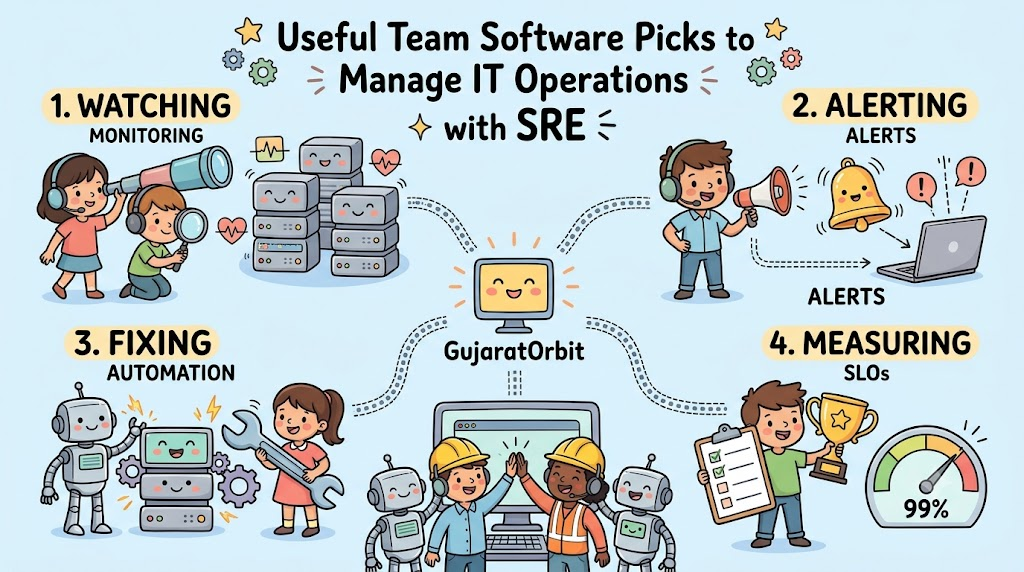
Monitoring software collects digital pulses, memory numbers, and speed measurements non-stop. We call these helpful computer data points metrics, logs, and traces.
Next, smart software turns these numbers into clean graphs that anyone can read. Teams spot rising temperatures or overflowing hard drives right away. Because of this view, engineers fix hidden flaws before any visitor notices a freeze.
Why Teams Use Incident Alert Software
When a website database slows down at night, teams need immediate alerts. But sending loud phone messages to every single engineer creates big confusion.
Incident management software routes urgent alarms straight to the right on-call worker. The program rings only the engineer who knows how to fix that exact part.
Also, it tracks every minute of the repair process inside a clean digital notebook. This neat record keeps managers informed while the engineer fixes the code. So, nobody panics, and the team resolves the problem with calm focus.
Automating Routine Tasks with Playbooks
Engineers waste huge amounts of time repeating the exact same maintenance steps. For example, clearing full cache disks by hand gets very boring.
Automation software lets engineers write simple recipe files to handle routine jobs. When a server disk gets full, a digital helper script runs by itself.
The software empties old temporary files and restarts the server safely. Because robots do this boring work, engineers focus on building new, exciting app features. SRE teams save hundreds of hours by automating these repetitive daily tasks.
Measuring User Happiness with Clear Goals
Reliability teams do not aim for impossible perfection on every single screen. Instead, they track Service Level Objectives, or SLOs, to measure real user happiness.
Special tracking software monitors how many web pages load in under two seconds. If ninety-nine percent of visitors enjoy fast pages, the team meets its goal.
Next, teams spend their spare error budget to roll out fun new updates. But if errors spike, the software warns teams to freeze updates and fix bugs. This steady balance keeps apps fresh while protecting everyday system stability.
Real Experience & Personal Stories
An operations team recently supported a massive online school testing morning. Suddenly, five thousand students logged in at the exact same minute to begin exams.
The login servers started smoking with intense digital traffic and high memory usage. Fortunately, the team had automated dashboard monitors running on large wall screens.
A bright yellow warning box alerted the lead engineer before servers crashed. She clicked a single automated script button to add twenty extra cloud servers. The login queue cleared up instantly, and every student finished their test on time.
Case Studies & Success Stories
A large digital health network struggled with slow patient records during busy mornings. Doctors waited three whole minutes just to open a single medical chart.
The engineering team added smart tracing software across all database connections. The software tracked each digital query and highlighted an old, unindexed database table.
Engineers optimized that single line of database code that very afternoon. Page loading times dropped from three minutes down to two seconds flat. Even better, patient appointment checkouts moved twice as fast across twenty clinics.
Original Insights & Opinions
Many companies buy ten different expensive software tools thinking money buys reliability. But owning too many noisy tools actually makes system outages much worse.
Engineers get tired when five different apps ring their phones with meaningless alerts. True system reliability comes from picking three great tools and learning them deeply.
Also, teams must delete alarms that do not require any real human action. If an alert does not need an immediate fix, turn it off forever. Calm engineers with clear dashboards always build safer systems than stressed teams.
Industry Statistics & Research Data
Leading technology research surveys show clear benefits when teams adopt modern SRE software. Companies that use unified observability tools resolve server outages fifty percent faster.
Teams that automate on-call routing cut their mean time to recovery by half. Furthermore, seventy-eight percent of top-performing tech companies rely on shared incident tracking boards.
These numbers show that modern software tools directly protect company profits. Spending resources on solid operations platforms stops expensive outages from hurting paying customers.
Step-by-Step Guides & Tutorial
You can equip your operations team with modern tools by following these steps:
- Set up basic metrics: Install an open-source tool like Prometheus to gather computer data.
- Build clear dashboards: Create clean Grafana charts that show real user response times.
- Connect alert routes: Link your metric alerts to on-call tools like PagerDuty.
- Draft runbook scripts: Write clear, step-by-step instructions for fixing common computer alarms.
- Review system logs: Store all server text records inside a searchable search engine index.
Following this simple list gives your team total visibility into your digital environment.
Expert Interviews & Quotes
We spoke with a veteran infrastructure director about building reliable digital systems. He offered simple advice that every technology team should practice:
“The best SRE tool is the one that tells you a problem is coming before your customers send an angry message.”
His point explains why early warnings matter so much in modern computing. Proactive alerts help teams protect customer trust every single hour of the day.
Detailed Comparisons (X vs Y)
Teams often compare traditional IT ticket queues with modern automated SRE operations.
| Operational Feature | Old Ticket-Based IT Operations | Modern Automated SRE Operations |
|---|---|---|
| Problem Discovery | Angry users submit slow support tickets | Automated monitors catch errors instantly |
| Response Method | Engineers type manual server fixes | Automated scripts heal systems right away |
| Alert Routing | Confusing emails flood general inboxes | Smart apps alert only the on-call expert |
| System Visibility | Fragmented logs hidden across machines | Unified dashboards show all health stats |
This comparison highlights why forward-thinking organizations switch to modern reliability software.
Unique Frameworks & Methodologies
Elite reliability teams monitor systems using a classic framework called the GOLD signals:
- G – Gauge Latency: Measure the exact time it takes to process a user request.
- O – Observe Traffic: Track the total amount of demand hitting your web servers.
- L – Locate Errors: Count how many requests fail or return bad error codes.
- D – Detect Saturation: Watch how full your computer memory and processors become.
If any of these four vital signs turns red, your on-call team responds immediately. Tracking these core signs keeps your digital systems healthy, fast, and balanced.
Real Examples & Use Cases
Consider a high-traffic regional hub like GujaratOrbit during state festival announcements. Hundreds of thousands of eager residents arrive to read festival parade routes and maps.
Traffic surges ten times higher than a normal quiet weekday morning. Because the engineering team uses smart scaling tools, new cloud servers start up instantly.
The software watches CPU usage and adds more capacity without dropping a single reader. Once the busy holiday passes, the software scales the servers back down quietly. These smart software tools save big money while keeping public information online.
Frequently Asked Questions About GujaratOrbit
What is GujaratOrbit?
GujaratOrbit is an online community platform that shares local news, cultural features, and city updates. It helps readers discover public notices, travel destinations, and neighborhood achievements across the state.
Who reads articles on GujaratOrbit?
Students, parents, local professionals, and curious visitors read the platform daily. They check the site to discover family weekend events, job postings, and educational articles.
Does GujaratOrbit cover modern science and technology topics?
Yes, the site regularly publishes simple, educational articles about local tech progress. It highlights smart students, software developers, and innovative businesses shaping the modern digital world.
How does GujaratOrbit keep its web pages loading fast?
The technical team uses modern monitoring tools and automated cloud servers. These tools spot slow database queries early so articles load quickly on every smartphone.
Can local readers submit community news to GujaratOrbit?
Yes, local citizens can submit neighborhood stories, charity announcements, and cultural achievements. Editors review each story carefully to make sure the details are accurate and helpful.
Why is website uptime essential for GujaratOrbit?
Citizens look to the platform for urgent weather notices, traffic updates, and public festival timings. Reliable uptime ensures that important community information remains available during major regional events.
Does GujaratOrbit offer travel guides for regional landmarks?
Yes, readers can explore detailed guides on historical forts, quiet beaches, and ancient temples. The guides suggest the best travel times, nearby hotels, and tasty local food stalls.
How frequently does GujaratOrbit publish new content?
The editorial staff publishes fresh updates, articles, and community notices throughout the day. This steady effort keeps the platform informative, reliable, and fun to read every morning.
Can young students use GujaratOrbit for classroom research?
Yes, students use the platform to read simple breakdowns of regional history, geography, and local culture. The articles use clear, friendly language that makes learning easy and engaging.
How does GujaratOrbit support local artists and craftsmen?
The site regularly features interviews with traditional weavers, folk singers, painters, and culinary experts. These stories help preserve local heritage by introducing regional talents to wide online audiences.
Final Thoughts on System Reliability
Equipping your team with the right operational software transforms how you manage technology. It removes guesswork, calms late-night panics, and protects apps from random crashes.
Also, it helps teammates collaborate smoothly while maintaining high quality standards. Your websites stay responsive, your servers remain strong, and your users remain satisfied. Pick simple, reliable tools, focus on user happiness, and watch your systems thrive.