Imagine you build a toy car out of blocks. You want it to roll fast, but you also want it to stay in one piece. Site Reliability Engineering, or SRE, helps software makers do both. It helps coders write new features quickly while keeping the apps working smoothly.
Many teams face big headaches when computer programs crash or freeze up. SRE gives workers clear rules to keep websites running without stopping new updates. You can learn these simple methods by visiting Sreschool.
When teams work well together, they fix issues before users see them. Next, let us look at what makes this way of working so helpful.
What Does Site Reliability Engineering Really Mean?
SRE means using code to run computer systems instead of doing manual steps. Think of it like a smart robot helper that watches your computer setup day and night.
In the past, one team wrote the code, and another team ran it. The two teams often argued when things broke.
Now, SRE brings these workers together. Both groups share one goal: make apps that run well and stay online.
The Main Steps of Writing Great Code
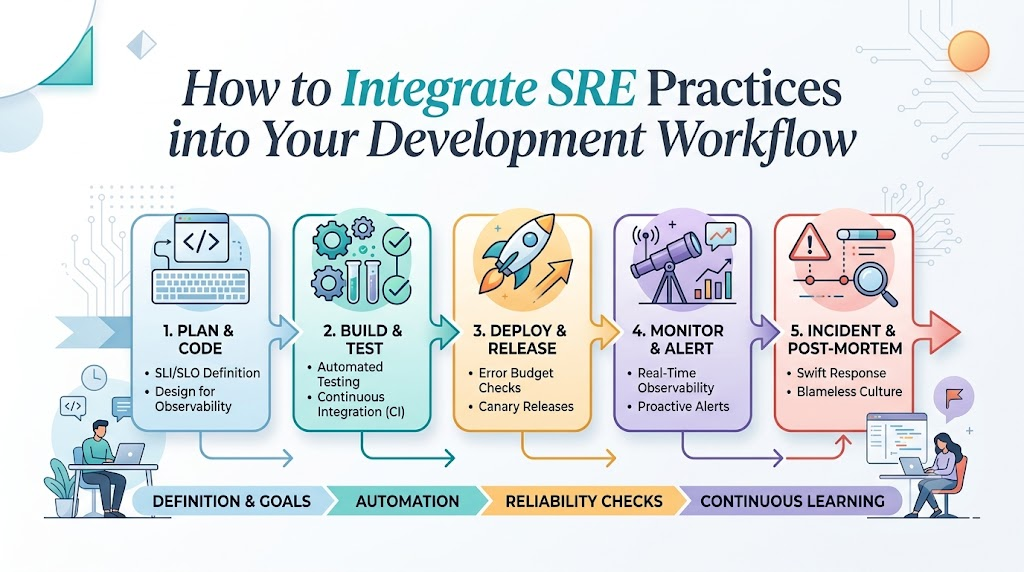
Every team follows a path to build computer programs. First, they write code on their laptops.
Next, they run tests to find mistakes early. After that, they send the code out to real users.
Finally, they watch how the app runs. SRE adds safety checks to each step so the app never falls apart.
Key Operational Concepts You Must Know
Before you start, you must learn four simple tools. These ideas help teams agree on what “working well” means.
Service Level Indicators: Measuring What Happens
A Service Level Indicator is a simple score that measures your system. It tells you how well your app is doing right now.
For example, it counts how many web pages open fast. It also counts how many times the app shows an error.
Service Level Objectives: Setting Your Goal
A Service Level Objective is the goal you want to hit. It is like aiming for an A on a spelling test.
You might say: “Our website must work fast ninety-nine percent of the time.” This gives the team a clear target to meet each month.
Error Budgets: Your Room for Small Mistakes
Nobody gets a perfect score every single day. An error budget is the small amount of downtime your app can have without hurting users.
If your goal is ninety-nine percent, you have one percent left for tiny slips. You can spend this room on new tests, fun updates, and fast experiments.
+-------------------------------------------------------+
|                    Your Total Time                    |
+---------------------------+---------------------------+
|    Working Time (99%)     |    Error Budget (1%)      |
|    Keep users happy!      |    Try new things safely! |
+---------------------------+---------------------------+
Clear Priority Levels: Sorting Out Problems
When something breaks, you must decide how bad it is. Teams use simple levels to sort problems quickly:
| Level | What Happened | What the Team Does |
|---|---|---|
| Sev-1 (Top) | The whole app is down | Everyone stops and fixes it right now. |
| Sev-2 (Medium) | One big part is broken | A small group fixes it in an hour. |
| Sev-3 (Low) | A tiny button looks funny | The team fixes it next week. |
Using this chart stops panic. It tells everyone what to do first.
Platform Implementation vs. Culture — What’s the Real Difference?
Many people think buying fancy software tools solves every problem. But tools are only half of the story.
You also need a kind, smart team culture. Let us look at how these two sides work together.
The Technical Platform
The platform means all the programs that watch your servers. These tools collect numbers and send alerts when computers run out of memory.
They act like fire alarms in a school hallway. But an alarm cannot put out a fire by itself.
The Blameless Culture
A blameless culture means we never yell at people when mistakes happen. Humans make typos, and code can have bugs.
Instead of pointing fingers, teams ask: “How did our safety nets miss this bug?” This keeps workers happy, honest, and ready to learn.
+-------------------------------------------------------+
|                 Blameless Culture                     |
|  - Fix the broken system, not the person.             |
|  - Speak up quickly when things break.                |
|  - Learn together from every slip-up.                 |
+-------------------------------------------------------+
Real-World Use Cases of Modern Operations
Making Shopping Apps Stay Online
A big online toy store kept crashing during big holiday sales. Their servers got too hot, and children could not buy presents.
The team added automatic scaling tools that add more servers when crowds arrive. They also set strict error budgets to stop broken updates during busy days.
Now, the toy store stays open, and the team enjoys stress-free holidays.
Saving a Game From Slowdowns
A popular phone game had slow load times. Players got mad because matches took five minutes to start.
The engineers set up traces to follow each click from the phone to the database. They found one tiny line of code that ran five thousand times by mistake.
They removed that line, and load times dropped to two seconds. The players cheered, and the game rating went up.
Common Mistakes in Operations Engineering
Even great teams make silly mistakes when they start. Here are two big traps to avoid.
Setting Too Many Loud Alarms
Some teams set alarms for every tiny thing. When your phone beeps all night for harmless hiccups, you get tired.
This problem is called alert fatigue. Soon, engineers ignore the beeps and miss real emergencies.
Only set loud alarms when a human must fix something right away.
[ Too Many Loud Alarms ] ---> [ Tired Engineers ] ---> [ Missed Outages ]
Forgetting to Write Down What Happened
After fixing a crash, some workers just go back to bed. They never write down what caused the problem.
This means the very same bug will break the app again next month. Always take thirty minutes to write a simple story of what broke and how you fixed it.
How to Become an Operations Expert — Career Roadmap
Do you want to work on big internet systems? Here is a simple path you can follow to grow your skills.
Step 1: Learn the Basics of Computers
Start by learning how operating systems talk to hardware. Learn how files, memory, and networks work together.
- Linux Basics: Learn how to type commands into a black terminal screen.
- Basic Coding: Write simple scripts with Python to clean up old files.
- Network Paths: Understand how a website picture travels across the ocean to your screen.
Practice these steps every week. They give you strong roots for the future.
Step 2: Learn Modern Cloud Tools
Next, learn how to build apps that run across hundreds of cloud servers.
- Containers: Pack your code into tiny neat boxes so it runs anywhere.
- Cloud Platforms: Rent computers in the cloud instead of buying heavy metal boxes.
- Automated Tests: Write code that checks other code before real users see it.
These skills make you a valuable teammate in any modern tech group.
FAQ Section
- Can small teams use these reliability ideas?Yes, any team can use these ideas. You only need a simple list of goals and a clear plan for bugs.
- What should I do if our error budget runs out?You must stop adding new features for a short time. Focus all your energy on fixing bugs and making your app stable again.
- Is SRE the same thing as writing code?SRE uses code, but it focuses on operations. SRE workers write software that protects other software from crashing.
- Why is a blameless post-mortem so important?It helps people speak the truth without feeling scared. When everyone shares facts freely, teams find and fix the real issue much faster.
- How fast should an alert wake someone up?An alert should only wake someone up if real users cannot use the product right now.
Final Summary
Integrating SRE practices into your daily work makes building software fun and safe. By setting simple targets, watching error budgets, and using smart alerts, your team can build faster without breaking things.
Always balance cool tools with a kind, blameless team spirit. When everyone works together to fix broken systems, your apps stay strong, and your users stay happy.