Computers power our favorite video games, video apps, and websites. But sometimes, these computer systems slow down or crash completely. When that happens, users get upset and cannot do their work.
Site Reliability Engineering, or SRE for short, keeps these computers running smoothly. SRE engineers act like computer doctors who fix problems fast. You can learn how to protect computer systems at Sreschool.
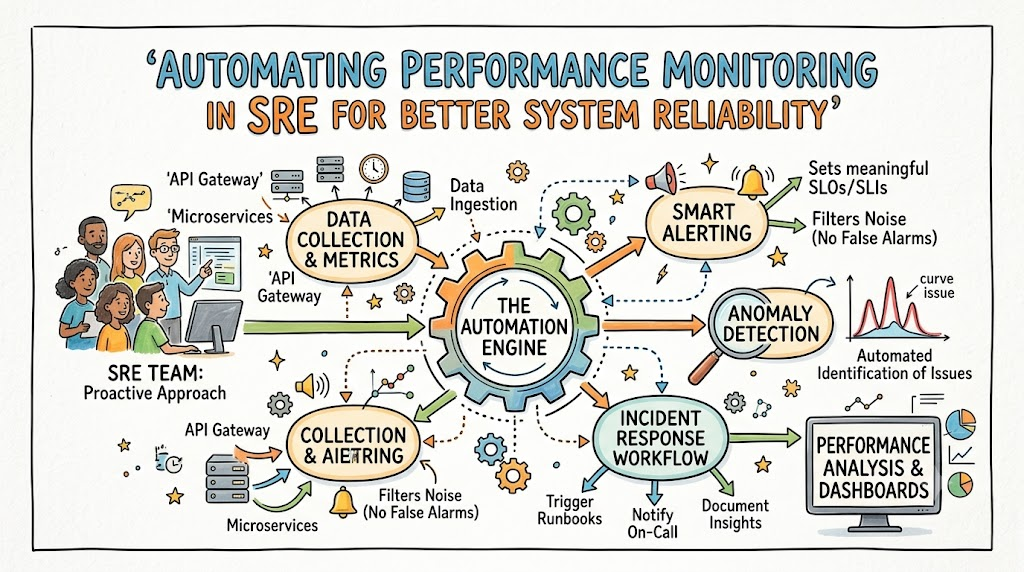
Now, engineers do not want to check screens all day. Instead, they write smart code to check the computers for them. This auto-checking is called automated performance monitoring. It finds small issues before they turn into giant crashes.
What Is Automated Performance Monitoring?
Think of a computer system like a busy toy factory. Many little machines run at the same time to make toys. If one belt stops, the whole toy factory might break down.
Monitoring is like putting a watchman near every machine. But a human watchman gets tired after a few hours. So, engineers build robot watchmen using smart computer code.
These robot watchmen read the speed of every machine day and night. They look at memory, chip heat, and network speed. If a machine gets too hot, the robot sounds an alarm right away.
Why SRE Teams Need Fast Automated Checks
Computers work very fast and process millions of clicks each second. A human mind cannot read all that data in real time. Because of this speed, small bugs can hide and grow rapidly.
Automated tools spot slow computers in just one second. Then, the tools alert an on-call engineer to step in. This quick notice stops games and websites from going offline.
Also, happy users stay on apps that load fast. When an app lags, kids and grown-ups leave it quickly. So, fast monitoring saves user trust and protects business money.
Key Operational Concepts You Must Know
Service Level Indicators: Taking the System Pulse
Doctors use a thermometer to check your body heat. In the same way, engineers use a Service Level Indicator, or SLI. An SLI is a simple number that shows system health.
For example, an SLI can count how many web pages open fast. If 99 pages out of 100 load fast, the score is 99 percent. Engineers watch this number to know if the system feels sick.
So, this simple score tells the team the whole truth. It removes all guessing from computer work.
Service Level Objectives: Setting the Target Goal
Next, teams set a target goal called a Service Level Objective, or SLO. An SLO is a promise the team makes to itself. It says how well the system must run over a full month.
For instance, a team might aim for 99 percent uptime. This means the app should work almost all the time. But it also leaves a tiny bit of room for surprises.
Because no machine is perfect, this target helps teams plan ahead. It sets a clear line between good health and bad trouble.
Error Budgets: Spending Room for Mistakes
An error budget is like pocket money for mistakes. If your goal is 99 percent uptime, you have 1 percent left over. You can spend that 1 percent to try fun, new updates.
When you make updates, things might break for a few minutes. That is totally fine if you still have budget left. But if you spend all your budget, you must stop all new work.
Then, the whole team works only on fixing old bugs. This clever rule keeps the system safe from messy changes.
| Metric Term | Plain English Meaning | Simple Example |
|---|---|---|
| SLI | The actual number you measure right now | App speed is 98% good today. |
| SLO | The goal number you want to hit | We want 99% good every month. |
| Error Budget | The tiny amount of failure you can afford | We can be down for 40 minutes. |
Platform Implementation vs. Culture — What’s the Real Difference?
The Technical Platform: Setting Up the Robot Tools
A platform is the box of tools your engineers use. It includes programs that gather computer logs, draw charts, and send alerts. These tools collect millions of tiny data points every single minute.
Engineers connect these tools to servers, cloud disks, and code apps. When set up right, these programs draw pretty line graphs. These graphs show if the computers run hot or cold.
However, fancy tools cannot fix broken systems alone. They only tell you that something broke down. Human beings still have to decide what to do next.
The Team Culture: How Humans Work Together
Culture is the way people treat each other during a big crash. In a bad culture, bosses yell and blame people for mistakes. That scares workers, so they hide errors under the rug.
In a good SRE culture, teams use blameless reviews. They know that good people make honest mistakes when systems are confusing. So, they fix the broken tools instead of punishing the worker.
This safe feeling helps engineers speak up early and share facts. Because everyone talks openly, the whole team learns and grows stronger together.
Bad Team Culture:
[ Server Breaks ] ---> [ Boss Blames Worker ] ---> [ Workers Hide Errors ]

Good SRE Culture:
[ Server Breaks ] ---> [ Team Fixes System ] ---> [ Systems Get Stronger ]
Real-World Use Cases of Modern Operations
Online Shopping on Huge Sale Days
Imagine an online toy store during a massive holiday sale. Millions of kids want to buy video games at the exact same moment. This giant wave of shoppers can crash the store servers.
Smart monitoring tools watch the incoming traffic wave every second. When the web servers get crowded, the automated tool orders new servers instantly. The robot code adds ten more servers in two minutes.
Because the system scales up by itself, no shoppers see an error screen. The store sells all its toys, and the website stays fast and happy.
Streaming Video Without Annoying Buffering
Now think about your favorite movie streaming app. Millions of families watch cartoons together on a Friday evening. If a video server stalls, the screen shows a spinning wheel.
Automated tracing tools follow each video stream from start to finish. If one video path gets slow, the tool spots the delay immediately. Then, the tool reroutes the video through a faster network line.
Kids keep watching their movies without any pause or lag. Most users never even notice that a network line broke behind the scenes.
Common Mistakes in Operations Engineering
Setting Off Too Many Loud Alarms
Some teams turn on loud alarms for every single tiny thing. If a fan slows down for one second, the system pages the engineer. This bad habit causes a problem called alert fatigue.
When your phone beeps all night, you get very tired. Soon, you start ignoring the loud beeps because most are harmless. Then, a real crash happens, and you sleep right through it.
To fix this, teams must silence noisy, useless alerts. Only send a page when a real human must fix a real emergency.
Forgetting to Read the System Story
Another big mistake is looking only at numbers without reading the full story. A chart might say the computer uses very little memory. But the app might still be broken for actual users.
Engineers must test the actual user journey from end to end. Can the user log in, click a button, and buy a game? If they cannot, low memory usage does not matter at all.
So, always focus on the real human experience first. Test the doors and windows of your app every day.
How to Become an Operations Expert — Career Roadmap
Step 1: Learn How Computers Talk to Each Other
First, you must understand the basics of computer networks and operating systems. Learn how Linux works because most internet servers run on Linux. Practice typing simple commands into a black terminal window.
- Learn Linux: Learn how files, memory, and running tasks work.
- Learn Networks: Discover how data packets travel across the web.
- Write Basic Code: Write simple scripts in Python to move files automatically.
These core steps give you superpowers. You will understand what happens under the hood when a website opens.
Step 2: Master Cloud Tools and Smart Robots
Next, step into the world of cloud servers and automated containers. Companies run their software inside small boxes called containers. Tools like Kubernetes steer these boxes like big cargo ships.
- Container Skills: Put simple apps inside neat software packages.
- Cloud Basics: Rent and start virtual servers with code templates.
- Metric Dashboards: Build colorful dashboards that show server health clearly.
These skills make you a true modern systems builder. You can build self-healing setups that fix themselves when parts fail.
FAQ Section
- What does SRE stand for in plain words?
SRE stands for Site Reliability Engineering. It means using computer code to keep websites and online services working smoothly all day.
- Why do we automate monitoring instead of watching screens?
Humans get tired, blink, and miss tiny clues hidden in giant piles of data. Software robots never sleep and can scan millions of numbers in one second.
- What is an on-call shift for an engineer?
An on-call shift means an engineer carries a special work phone for a week. If a big server goes down at night, the phone rings to wake them up.
- Can small apps use automated monitoring too?
Yes, even small blogs and school websites can use simple free monitoring tools. Setting up alerts early stops nasty surprises as your visitor numbers grow.
- What is a blameless post-mortem meeting?
It is a team chat after a big crash where no one points fingers or yells. The team works like detectives to find what broke and how to fix it forever.
Final Summary
Automating performance monitoring helps modern SRE teams build fast, happy, and rock-solid systems. Instead of waiting for users to complain, smart code spots trouble ahead of time. Teams set clear goals with SLIs, SLOs, and error budgets to protect user happiness.
Also, great teams balance smart software tools with a kind, blameless team culture. When servers break, engineers learn from the mess and make the whole system safer. This healthy habit turns everyday mistakes into valuable lessons for everyone.
As computer networks grow bigger, automated tools will only become more important. Learning these skills gives engineers the power to run huge internet platforms with ease. Start small, write helpful scripts, and build systems that stay online no matter what happens.