Computers run our favorite games, apps, and websites every single day. But sometimes bad people try to break these systems. Other times, computer parts simply break down by accident.
Engineers must keep these systems fast, safe, and always working. They write computer programs to guard their web apps day and night. You can learn these smart safety methods by visiting Sreschool.
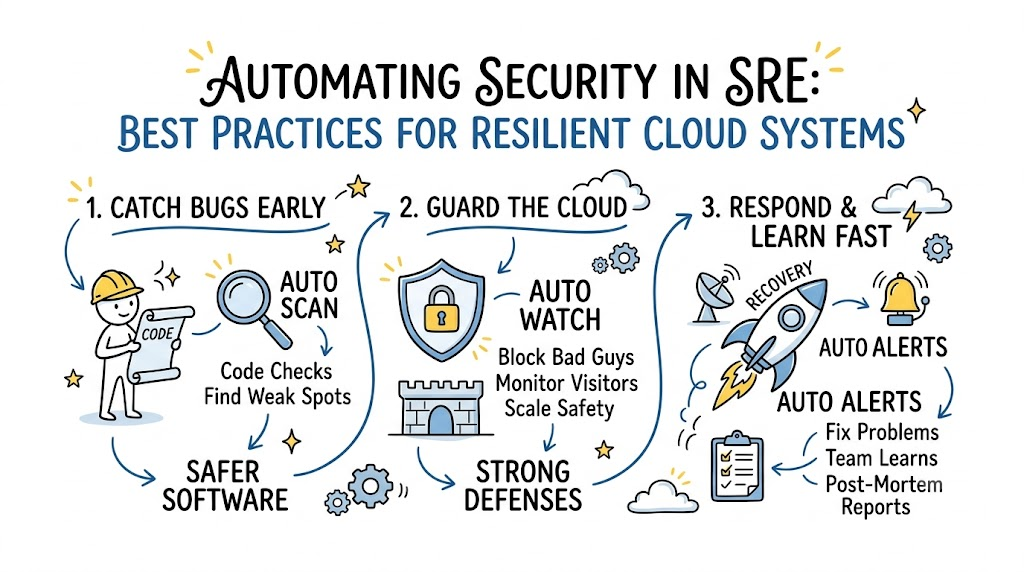
When teams automate safety checks, computers fix small bugs on their own. This quick work keeps apps running smoothly for everyone. So, users stay happy, and private data stays safe.
What Does Security Automation Mean?
Think of a big bank with many doors and windows. A single human guard cannot watch every door at once. The bank uses smart alarms and cameras to help instead.
Security automation works the very same way for computer systems. Engineers write simple code to watch for sneaky digital bugs. These smart tools run automatic checks on every single file.
If a tool spots danger, it rings an alarm right away. Next, it locks the broken digital door before hackers get inside. This quick step keeps your private messages safe.
Why Reliability Engineers Need Fast Security
Reliability engineers make sure websites never crash or slow down. But a single hacker attack can crash an entire computer network. Broken safety rules cause huge site outages.
Fixing safety by hand takes far too much time. Humans get tired, make typos, and miss hidden problems. Computers, however, run tests at lightning speed without getting sleepy.
So, engineers combine safety checks directly with daily website maintenance. This team effort stops site crashes before they ever happen. As a result, web services stay online all day.
Key Operational Concepts You Must Know
Setting Clear Safety Goals
Every team needs simple safety targets called Service Level Objectives. Think of them like an attendance score at school. You aim to score ninety-nine percent or higher.
If your score drops, you must stop and fix the problem. Teams track these numbers on a big computer screen. This trick helps them spot bugs very early.
Using an Error Budget
An error budget tells you how many small mistakes you can afford. It works just like pocket money for toys. When you spend it all, you cannot buy any more toys.
If your web system has too many safety bugs, your budget runs out. When this happens, workers stop making new games or features. Instead, they fix all safety holes right away.
+-------------------------------------------------------+
|                 The Error Budget Rule                 |
+-------------------------------------------------------+
|  1. Full Budget   -> Build fun new app features.      |
|  2. Half Budget   -> Watch systems more closely.      |
|  3. Empty Budget  -> Stop! Fix all safety bugs first. |
+-------------------------------------------------------+
Ranking Incident Danger Levels
When a problem happens, workers must sort it by danger size. We call this step triage. Sorting keeps workers calm during scary computer crashes.
| Incident Level | Danger Size | What Workers Must Do |
|---|---|---|
| Sev-1 (High) | The whole site is down | Wake up the main team right away. |
| Sev-2 (Medium) | One part runs slow | Fix the bad code within one hour. |
| Sev-3 (Low) | A small visual mistake | Fix it tomorrow during regular work. |
Using this simple chart saves precious minutes during real emergencies. Responders know exactly which fire to put out first. So, your favorite games get back online quickly.
The Best Tools to Protect Your Cloud
+------------------+     +------------------+     +------------------+
| Code Scanner     | --> | Cloud Guard      | --> | Fast Alert       |
| (Catches Typos)  |     | (Blocks Hackers) |     | (Wakes Engineer) |
+------------------+     +------------------+     +------------------+
Engineers use special software tools to guard their digital worlds. First, code scanning tools read program files like a spelling checker. They spot weak spots before the code ever goes live.
Next, cloud watchdogs monitor incoming network visitors every second. If an unknown visitor sends strange traffic, the tool blocks them. This keeps the main application fast and secure.
Finally, smart alert bots notify engineers when safety alarms go off. These bots send short text messages to on-call workers. So, help arrives fast when an emergency starts.
Platform Implementation vs. Culture — What’s the Real Difference?
Buying Tools vs. Changing Habits
Many companies buy fancy software tools and expect miracles. But buying a fast race car does not make you a race driver. You still need proper driving skills.
Tools simply show you where a problem hides in the code. Human engineers must still step in and fix the broken system. So, good tools are useless without smart team habits.
A good platform helps workers test their files without headaches. It speeds up their daily work and clears away boring tasks. But human teamwork remains the most important piece.
Building a Safe and Blameless Team
A blameless culture means nobody gets yelled at for honest mistakes. When an app crashes, workers do not point fingers. Instead, they ask how the system let that mistake happen.
+-------------------------------------------------------+
|                 Blameless Culture                     |
|  - Focus on fixing the broken system.                 |
|  - Workers tell the truth without fear.               |
|  - Everyone learns and grows together.                |
+-------------------------------------------------------+
                           ^
                           | (Opposite Ways)
                           v
+-------------------------------------------------------+
|                  Blameful Culture                     |
|  - Bosses punish workers for small errors.            |
|  - Workers hide bugs to avoid trouble.                |
|  - Systems break more and stay weak.                  |
+-------------------------------------------------------+
When bosses punish workers, people hide their mistakes in secret. Hidden bugs grow bigger until the whole computer network fails. But open teams fix problems fast because nobody feels afraid.
Real-World Use Cases of Modern Operations
Stopping Rogue Passwords from Leaking
A big shopping app once had workers typing secret keys directly into code. One day, an engineer shared a file online by mistake. Sneaky hackers tried to steal the store keys.
Luckily, an automated safety scanner caught the file in two seconds. The robot tool cancelled the old key immediately. Next, it made a fresh, secret password on its own.
[ Engineer Saves File ] ---> [ Bot Scans Code ] ---> [ Secret Key Found! ]
                                                            |
                                                            v
                                            [ Bot Cancels Key & Makes New One ]
Because the robot acted so fast, no customer lost any money. The engineers learned to use secret storage boxes for passwords. Now, the shopping system stays safe every single day.
Blocking Huge Waves of Fake Traffic
A popular video website faced a giant attack during school holidays. Bad computers sent millions of fake clicks all at once. This huge wave tried to knock the servers down.
The automated defense platform noticed the traffic spike within seconds. It instantly put up a digital shield to block the fake requests. Meanwhile, real kids watched their favorite cartoons without any trouble.
[ Bad Computer Wave ] ---> [ Digital Shield ] ---> [ Blocked at the Door! ]
                                   |
[ Real Kids Watching ] --------> [ Safe Server ] -> [ Cartoons Play Fine! ]
This automatic shield saved the company tons of money. Human engineers did not even need to log in to fix it. The smart system did the hard work all by itself.
Common Mistakes in Operations Engineering
Too Many Noisy Alarms
Some teams turn on every single alarm they can find. Their phones buzz and chime hundreds of times every night. Most of these alarms are for tiny, harmless things.
Soon, the tired engineers start ignoring their noisy phones. Then, a real emergency happens, and nobody wakes up to fix it. We call this dangerous problem alert fatigue.
Teams must turn off silly, harmless alarms right away. Only send an alert when a human must fix something big. This rule lets engineers sleep well and stay alert.
Forgetting to Learn from Past Accidents
Another big mistake is walking away as soon as the site works. If you do not write down what happened, you will forget. Soon, the very same bug will break your app again.
Teams must write a simple post-mortem story after every outage. They list what broke, how they fixed it, and what they learned. This helpful habit keeps the team smart and prepared.
How to Become an Operations Expert — Career Roadmap
Step One: Learn Simple Coding and Linux
Start by learning how computer operating systems like Linux work. You should learn how files move and how apps talk to memory. This basic knowledge helps you solve tricky computer puzzles later.
- Linux Basics: Learn how to move files using a black text screen.
- Python Scripts: Write small programs that do boring chores for you.
- Web Basics: Learn how internet routers send data to your home screen.
Practice these simple skills on a cheap computer at home. Soon, you will write scripts that manage files automatically. This foundation prepares you for big cloud engineering jobs.
Step Two: Master Cloud Platforms and Containers
Next, learn how to run apps inside lightweight digital boxes called containers. Containers keep programs neat and tidy so they run anywhere. Then, learn how to manage thousands of containers using cloud tools.
- Container Tools: Pack your apps so they run on any computer easily.
- Cloud Basics: Rent digital computers online using code instead of buying hardware.
- Auto Guards: Build scripts that test your code for bugs before saving.
These skills make you a true digital defender. Companies love hiring engineers who know how to protect large cloud networks. With steady practice, you can build a wonderful technology career.
FAQ Section
- What is the simplest way to explain automated security?It means using smart computer programs to guard apps instead of watching them by hand. The programs find bugs and fix them fast without needing a human to click buttons.
- Why do teams prefer computers over humans for safety checks?Computers check millions of code lines in seconds without getting tired. Humans get sleepy, make typos, and miss small bugs when reading boring lists.
- Does automated security mean humans lose their engineering jobs?No, it simply removes boring chores so humans can solve fun, creative problems. Engineers still design the systems, write the rules, and guide the defense tools.
- What happens when an error budget runs out of money?The engineering team stops building new features for a little while. They spend all their work hours fixing bugs and making the system strong again.
- Why should companies run blameless post-mortem meetings?When bosses do not yell at workers, people tell the whole truth about mistakes. This honesty helps the team fix the real system flaws so accidents never repeat.
Final Summary
Keeping computer systems safe and reliable is an exciting, important job. When teams use automated tools, they catch pesky bugs before anyone gets hurt. Smart alerts, error budgets, and simple severity charts help workers handle digital fires without panic.
Remember that great tools work best when teams practice kindness and open honesty. Never blame people for accidents; fix the broken system instead. By learning basic code, operating systems, and automation habits, you can build super strong platforms that keep the internet fun and safe for everyone.