Computer software runs almost everything today. People use apps on phones to play games, talk to friends, and buy food. But writing software takes hard work and many steps.
Developers write new computer code every single day. Next, they need to test this code so it does not break. You can learn these smart tech skills easily at Sreschool.
Reliability engineers make sure apps never go down. They keep websites working smoothly for every user. When coders and reliability teams work together, great things happen.
What Is CI/CD in Simple Words?
Computers need clear instructions to run apps. Developers write these instructions using code. But people make mistakes when they type fast.
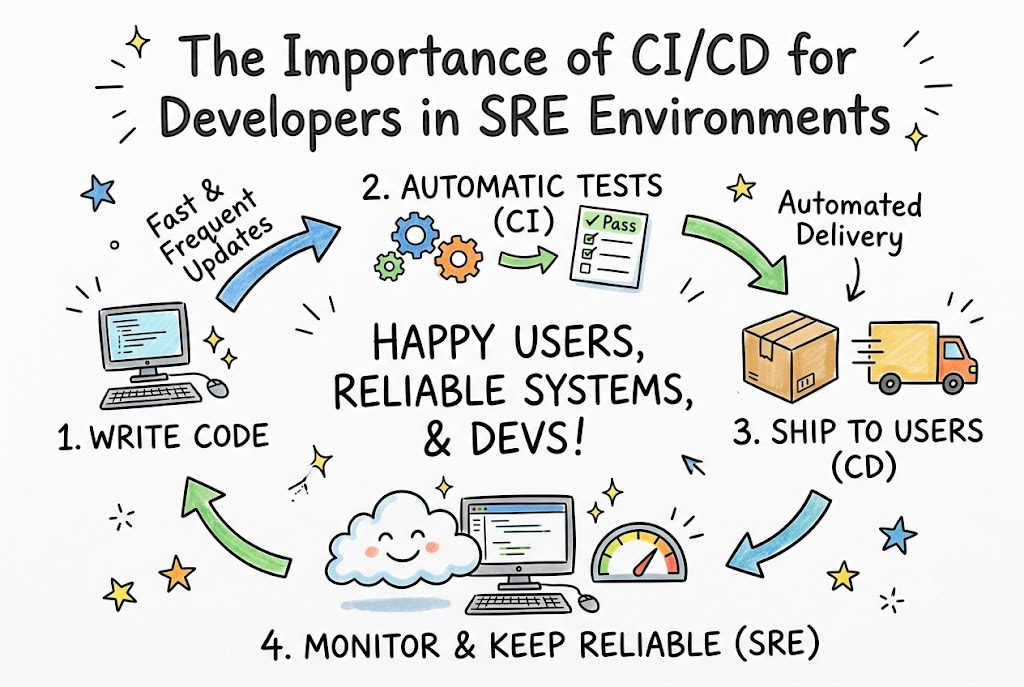
CI stands for Continuous Integration. It means putting new code into the main project often. A smart robot tests the code right away.
CD stands for Continuous Delivery. It means sending tested code to users automatically. So, new features reach people without long delays.
How CI/CD Helps Software Builders
In the past, coders saved work on their own computers. They shared their code only once a month. This caused giant traffic jams and huge bugs.
Now, CI/CD tools test small bits of code every hour. The tool finds errors before users see them. So, developers fix mistakes fast and stay happy.
Also, teams waste less time doing boring manual chores. Robots build the app and run the tests. Coders can focus on building fun new features.
What Is an SRE Environment?
SRE stands for Site Reliability Engineering. It means using software tools to run computer systems smoothly. SRE teams want websites to stay fast and stable.
Developers love to add new features quickly. But reliability teams want to protect systems from crashes. Sometimes, these two goals bump into each other.
CI/CD builds a strong bridge between both groups. It lets developers ship features fast without breaking systems. So, everyone wins and the website stays online.
Key Operational Concepts You Must Know
Service Level Objectives Made Easy
A Service Level Objective is a clear promise for system health. Teams pick a number to measure success. For example, an app must work 99% of the time.
If the app gets too slow, the team stops releasing new code. They spend time fixing bugs instead. This simple rule protects user trust every single day.
Understanding the Error Budget
An error budget is the room you have to make mistakes. No computer system runs perfectly all the time. Small errors will always happen.
If your app must work 99% of the time, you have a 1% budget. Teams use this budget to try bold new ideas safely. But if they run out of budget, they must freeze updates.
Severity Levels and Fast Help
When an app breaks, engineers sort the problem by size. They call this sorting triage. Big problems get help right away.
| Level | What Happened | What Teams Do |
|---|---|---|
| Sev-1 | The whole app is broken | Everyone stops work to fix it now |
| Sev-2 | A big feature is broken | Engineers fix it within one hour |
| Sev-3 | A tiny button looks funny | Coders fix it during normal work hours |
This table keeps everyone calm during an emergency. Engineers know who must wake up and help. So, nobody panics when an alarm rings.
Taking Turns on Duty
Reliability teams take turns watching the systems at night. Engineers call this on-call duty. One person holds the team pager for a week.
If an alarm sounds, that person checks the dashboard. If the problem is too hard, they call a teammate for help. This team system keeps workers well rested.
Platform Implementation vs. Culture — What’s the Real Difference?
Setting Up the Software Tools
Teams buy or build fast tools to automate their work. They set up pipelines that build, test, and release code. These tools gather useful data from every server.
[ Developer Code ] ---> [ Automated Tests ] ---> [ Live Website ]
Tools do the heavy lifting day and night. They run tests much faster than any human can. But good tools alone cannot save a broken team.
Building a Safe and Kind Culture
A good culture means people feel safe when things break. Engineers do not blame each other for bugs. They know systems fail because tools need better guardrails.
+-------------------------------------------------------+
|                 Blameless Culture                     |
|  - Fixes systems instead of yelling at people         |
|  - Talks openly about mistakes                        |
|  - Helps everyone learn and grow                      |
+-------------------------------------------------------+
When bosses punish mistakes, workers hide their errors. That makes systems weak and dangerous. But open teams fix problems together and make software stronger.
Real-World Use Cases of Modern Operations
Shipping Video Game Updates Safely
A popular game studio wanted to add new maps every week. In the old days, each update crashed their servers. Players grew angry because games would freeze mid-match.
Next, the studio set up an automated CI/CD pipeline. The pipeline checks every game level for memory leaks before launch. Now, players get fresh maps weekly without lag.
Stopping Big Bank Checkout Crashes
An online shopping app kept crashing on busy holidays. Millions of shoppers clicked buy at the exact same second. The main payment database could not handle the load.
[ High Shopper Traffic ] ---> [ CI/CD Catches Overload Bug ] ---> [ Happy Shoppers ]
The team built automated stress tests into their pipeline. The tool creates fake traffic to test system limits. Now, the app stays fast during major sales.
Common Mistakes in Operations Engineering
Too Many Noisy Alarms
Some teams turn on every single alarm they can find. Their phones ring all night for tiny, harmless glitches. Engineers get tired and ignore the noise.
This bad habit is called alert fatigue. Soon, someone sleeps through a giant crash. Teams must silence silly alerts and keep only critical alarms.
Skipping the Post-Mortem Step
A post-mortem is a meeting after an outage to review what happened. Some teams skip this step because they feel too busy. This is a huge mistake.
If you do not find the real flaw, it returns soon. Smart teams write down the exact story of the fix. Then, they build automated tests to block that bug forever.
How to Become an Operations Expert — Career Roadmap
Learning Basic Commands and Code
Start by learning basic computer skills on your own machine. Learn how the Linux operating system handles files and memory. Next, learn to write small scripts with Python.
- Linux Basics: Learn how to move files and check running programs.
- Basic Scripting: Write short scripts to do repetitive chores automatically.
- Git Skills: Save code versions safely so you never lose your work.
These simple tools give you strong superpowers. You can control servers with a few simple keystrokes. Soon, you will write scripts that run entire data centers.
Mastering Cloud Tools and Containers
Next, learn how modern internet companies run apps inside containers. Containers wrap apps in neat, tidy boxes. Then, learn how Kubernetes herds these boxes across the cloud.
- Docker Containers: Pack your code and tools into simple boxes.
- Cloud Basics: Rent computers on the internet to run your apps.
- Pipeline Automation: Build scripts that test and push code automatically.
These skills open big doors in the tech industry. Companies pay top dollar for engineers who keep systems running. You can help build the future of the internet.
FAQ Section
- Why do developers need CI/CD pipelines?Pipelines run boring checks automatically so developers do not have to test manually. This saves lots of time and catches silly bugs early.
- What does SRE mean in simple words?SRE stands for Site Reliability Engineering. It means using computer code to keep websites running fast without breaking down.
- Can small teams use CI/CD tools?Yes, even a team of two developers can use simple automated pipelines. It makes work easier, faster, and much more fun.
- What happens when an error budget runs out?The team stops adding new features to the app right away. Instead, they spend their work hours fixing bugs and making servers stable.
- Why should teams avoid blaming people for mistakes?Blaming people makes workers scared to tell the truth about bugs. When teams stay kind and open, they fix root problems much faster.
Final Summary
CI/CD pipelines help developers build great software without fear. Automated checks find mistakes early before real users notice anything wrong. This speed keeps customers happy and lets businesses launch fun features every single day.
Reliability engineering adds strong guardrails so systems never fall down under heavy traffic. When teams use clear error budgets and kind team habits, magic happens. You get rock-solid apps, happy coders, and smooth experiences for everyone online.