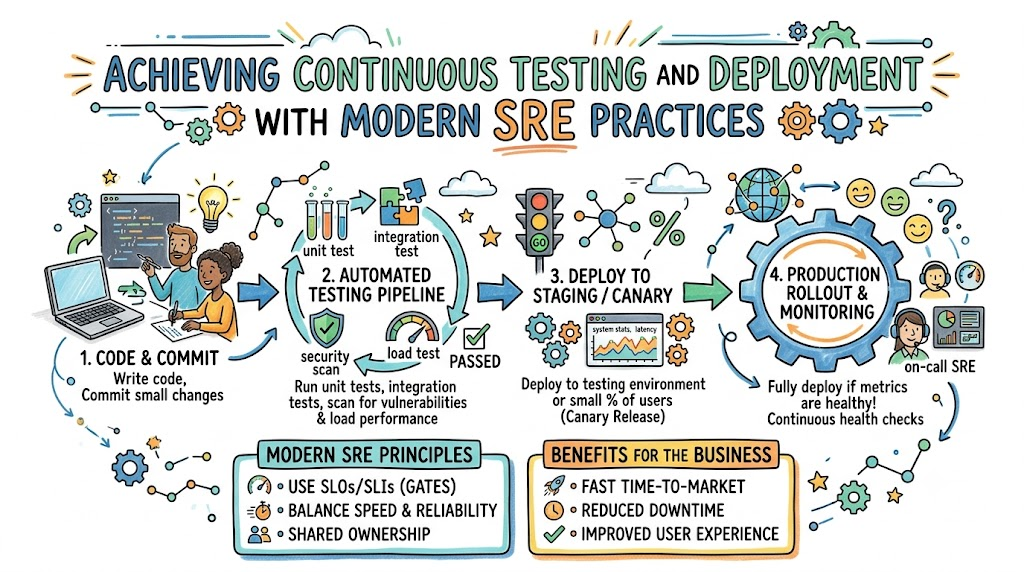
Modern web apps and phone games need updates all the time. Developers add cool features, fix bugs, and make apps run faster. But if you push updates too quickly, the system might crash.
Site Reliability Engineering helps teams ship code without breaking things. SRE engineers create smart guardrails so updates deploy safely. You can learn how to build reliable systems at Sreschool.
Continuous testing checks your software every single time code changes. Continuous deployment then ships that code to users automatically. When you combine both, your software stays fresh, fast, and stable.
What Are Continuous Testing and Deployment?
Think of writing software like baking cookies for a big school party. Before you bake a thousand cookies, you must test the recipe. You check the sugar, test the oven heat, and taste one cookie first.
Continuous testing runs little checks on your code automatically. Every time an engineer writes new code, computer robots test it right away. The tests look for math errors, broken buttons, and security gaps.
Continuous deployment is the delivery truck that brings the cookies to the party. If all tests pass, the robot truck delivers the new update to users. If any test fails, the truck stops immediately and calls the baker.
Why Reliability Teams Automate the Delivery Path
Old-school software teams shipped updates by hand once every few months. Workers stayed up all night on weekends to copy files. Often, huge mistakes slipped through, and websites went down for hours.
Modern teams automate this path to avoid messy human mistakes. Smart software robots can test and ship code thousands of times a day. Because robots follow exact rules, they never forget a step or get tired.
Also, small updates are much easier to fix than giant ones. If a tiny code change causes trouble, you spot it right away. Then, you can undo that single change in just a few seconds.
Key Operational Concepts You Must Know
Service Level Objectives as Safe Release Gates
A Service Level Objective acts like a safety gate for new code. It tells the team how well the app must run for happy users. For example, your goal might be 99 percent error-free visits each week.
If your app meets this goal, the release pipeline stays open. The system allows new code updates to flow out to real users.
However, if user errors spike, the safety gate shuts instantly. The deployment system blocks all new feature releases automatically. Then, the team must focus on fixing the system health before shipping anything else.
Error Budgets Guide Safe Software Releases
Your error budget is the small amount of downtime you can afford. Think of it as spending money saved in a piggy bank. When the piggy bank has plenty of coins, engineers can take risks and ship fast.
Every time a release causes a tiny bug, you lose a few coins. If you ship broken code too often, your piggy bank empties out completely.
Once your error budget hits zero, all new code deployments stop. The team uses that pause to write better tests and clean up messy code. This simple rule balances speed with system safety.
Canary Releases: Testing Code with Real Users
A canary release tests new updates on a tiny group of real users first. Long ago, miners took a canary bird into coal mines to detect bad air. If the bird stayed healthy, miners knew the air was safe.
In software, teams send new code to only two percent of visitors. The monitoring system watches those users closely to see if their apps crash.
If the canary users stay happy, the system sends the update to everyone else. But if errors pop up, the system rolls back the update in seconds. The rest of your users never even notice a problem.
| Release Style | How It Works | Good Points | Bad Points |
|---|---|---|---|
| All-at-Once | Updates every server at the exact same second | Very fast to complete | Crashes everything if a bug exists |
| Rolling | Updates one server after another slowly | No downtime during install | Takes more time to finish |
| Canary | Tests on a tiny slice of real traffic first | Very safe for users | Needs smart routing tools |
Platform Implementation vs. Culture — What’s the Real Difference?
The Technical Platform: Pipelines and Automated Tools
The platform is the digital machinery that tests and ships your software. It uses code pipelines to build apps, run unit tests, and spin up test servers. These tools check every line of code without asking for human permission.
Engineers use tools to pack code into neat software boxes. Then, automated scripts test these boxes in simulated networks. If a test fails, the pipeline lights up red and stops.
Yet, having the best tools will not protect you if people cut corners. A fancy automated pipeline is useless if engineers skip writing tests. Tools provide the road, but human habits drive the car.
Team Culture: Shared Ownership and Blameless Learning
A healthy culture means developers and operations engineers work as one team. In weak teams, developers throw broken code over the wall for operators to fix. In strong SRE teams, everyone takes pride in building reliable software.
When an update breaks production, great teams run blameless post-mortems. They do not point fingers, yell, or punish the person who pushed the button.
Instead, they ask why the automated tests failed to catch the bug. Then, they write a new automated test to catch that exact mistake next time. This positive mindset helps everyone learn and build stronger systems together.
Old Blame Culture:
[ Bug Appears ] ---> [ Boss Yells at Coder ] ---> [ Team Fails to Grow ]

Modern SRE Culture:
[ Bug Appears ] ---> [ Team Adds New Test ] ---> [ System Becomes Safer ]
Real-World Use Cases of Modern Operations
Keeping a Banking App Online During Friday Paydays
A large bank needed to update its mobile app without freezing user accounts. On Friday paydays, millions of workers check their account balances at noon. A bad update during that lunch rush would cause mass panic.
The bank used automated pipelines with strict canary stages. The new transfer feature rolled out to just one percent of users first. Automated tools checked payment latency and error rates every second.
When latency jumped by 50 milliseconds, the pipeline rolled back the code instantly. Only a few test accounts felt the lag for two minutes. The main bank systems stayed fast, safe, and open for all users.
Shipping Daily Game Patches to Millions of Players
An online battle game company wanted to balance hero powers every day. In the past, players had to download massive patches every few months. This slow process made gamers bored and frustrated.
The studio built automated testing suites that simulate thousands of virtual battles in minutes. When a game designer tweaks a sword damage number, the tests run immediately.
If the simulated battles run without crashing, the code deploys to live game servers. Gamers get fresh, fun updates daily without ever waiting for a server reboot.
Common Mistakes in Operations Engineering
Writing Flaky Tests That Fail Randomly
A flaky test is a test that fails when nothing is actually broken. Network hiccups or slow test runners can cause these false alarms. When tests fail randomly, engineers lose trust in the automated system.
Soon, workers start ignoring test warnings and click bypass buttons. That is when real, dangerous bugs sneak into your live software.
Teams must fix or delete flaky tests as soon as they appear. Every single test in your pipeline must give a clear, honest, and trusted result.
Skipping Automated Rollbacks
Some teams automate the deployment step but forget to automate the rollback step. When a bad bug slips into production, the on-call engineer panics. Trying to roll back an update by hand under pressure leads to huge mistakes.
Your delivery pipeline must know how to back out of a bad release automatically. If error counts spike, the system should restore the older, safe version right away.
Fast rollbacks save your team’s sleep and protect your company’s good name. Build and practice your rollback plans long before emergencies happen.
How to Become an Operations Expert — Career Roadmap
Step 1: Master Version Control and Test Basics
Begin your learning path by getting comfortable with code version tools. Learn how to save your code history and merge code branches without errors. Next, practice writing simple unit tests that check small pieces of code.
- Git Basics: Learn how to commit, branch, and merge code cleanly.
- Writing Tests: Build unit and integration tests to verify code logic.
- Shell Scripts: Write short terminal scripts to automate daily tasks.
These core skills help you understand the software development lifecycle. They teach you how code moves from a coder’s laptop into a shared project.
Step 2: Build Cloud Pipelines and Safety Guards
Next, learn how to build automated pipelines using modern continuous integration tools. Learn how to package applications into software containers for easy deployment. Then, connect your pipelines to real-time monitoring tools to build automated canary releases.
- Container Packaging: Put apps inside neat, portable software containers.
- CI/CD Tools: Set up pipelines that run tests on every single code commit.
- Automated Guardrails: Hook up monitoring metrics to pause bad releases automatically.
Mastering these skills makes you a key player in any modern engineering team. You will have the power to help companies release code rapidly while keeping their systems rock-solid.
FAQ Section
- What is the difference between continuous delivery and continuous deployment?
Continuous delivery prepares safe code so a human can approve the release with one click. Continuous deployment skips the human approval and pushes working code directly to users automatically.
- How does continuous testing help site reliability?
It catches broken code and speed issues early before users ever see them. Finding bugs while writing code is much cheaper and faster than fixing outages later.
- What happens if a canary release detects high error rates?
The automated deployment system stops sending user traffic to the new version immediately. It reroutes all users back to the stable older version within seconds.
- Can small teams use continuous testing without high costs?
Yes, many testing and code pipeline tools offer free starter plans for small projects. Starting with simple automated unit tests costs very little and saves hundreds of hours of debugging.
- Why are fast rollbacks better than fast hotfixes?
Fixing broken code during an outage takes time and creates panic. Rolling back to a known working version restores service right away, giving you plenty of time to fix the bug calmly.
Final Summary
Achieving continuous testing and deployment gives engineering teams the power to ship updates safely and quickly. By using automated test suites, teams catch dangerous bugs long before users ever spot them. Using canary rollouts and automated rollbacks protects production systems from major downtime.
Equally important, SRE relies on a supportive, blameless team culture to succeed. When teams manage error budgets together, they balance rapid feature work with rock-solid system stability.
As software platforms grow larger, automated release pipelines become vital for every business. Start by writing clear automated tests, set up safe canary stages, and build strong deployment guardrails. With these modern practices in place, your systems will stay fast, healthy, and reliable for all your users.