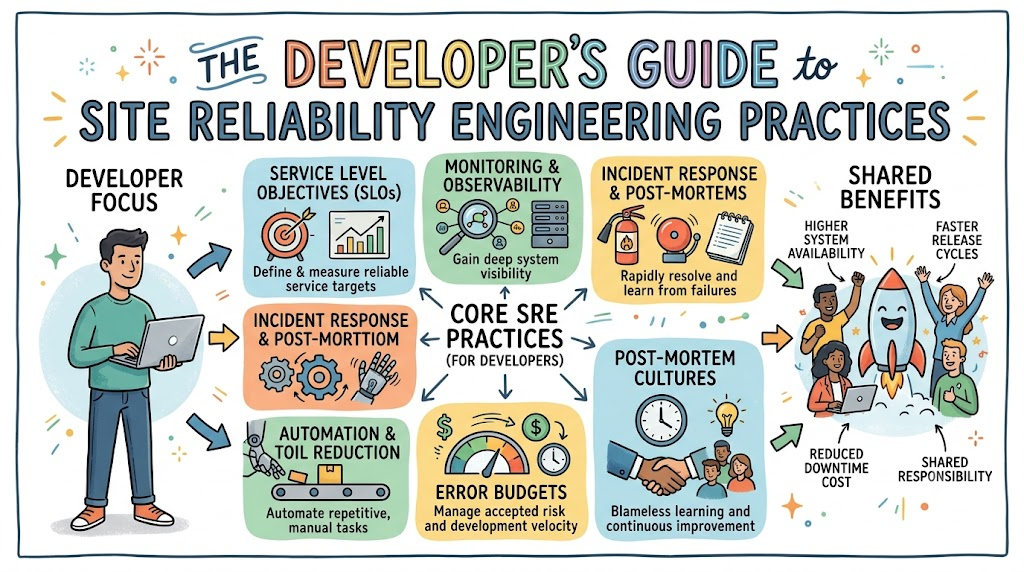
Computers run our favorite games, apps, and websites every single day. But what happens when an app stops working or crashes? In the past, builders wrote the code and handed it to other workers. Today, builders use special rules to keep apps fast, safe, and online. You can learn these great computer skills at Sreschool.
Site Reliability Engineering is also called SRE for short. It means using computer code to fix computer problems before people get upset. When you build apps this way, you make users very happy. Let us look at how you can use these simple rules in your work.
What Is Site Reliability Engineering?
Imagine you build a giant castle made out of plastic blocks. You want your friends to play inside it without knocking the walls down. SRE is like the strong glue that holds your block castle together. It teaches builders how to make apps that do not break easily.
In the old days, builders wrote code and walked away to play. Other workers had to fix the broken parts late at night. That caused lots of yelling and grumpy faces at work. So, teams created a better way to work together as friends.
Now, builders write software to run the software automatically. If a computer gets too hot, another computer takes over right away. Because of this, kids and adults can play games without scary error screens.
The Old Way vs The New Way
Years ago, people divided computer jobs into two separate rooms. Builders sat in one room and made fun new features. Operators sat in the other room and guarded the computers like watchdogs.
The builders wanted to change things every single day. But the operators wanted nothing to change so things stayed safe. This caused a big fight between the two groups.
| Old Way of Working | Modern SRE Way |
|---|---|
| Builders throw code over a tall wall. | Everyone owns the app together. |
| Workers fix computers by hand. | Code fixes the computers automatically. |
| People blame each other when apps break. | Teams learn from mistakes without blame. |
Today, both teams sit together and share the same big goals. When an app stays fast and online, everybody celebrates together.
Key Terms Every Builder Must Know
To talk like a pro, you need to know three simple terms. These three terms sound fancy, but they are very easy to learn. They act like scoreboards in a basketball game.
First, we have SLI, which means Service Level Indicator. It is just a number that shows how your app is doing right now. For example, it counts how many web pages open quickly for visitors.
Second, we have SLO, which means Service Level Objective. This is the target score you promise to hit every month. You might say, “We want our app to work 99 percent of the time.”
+-------------------------------------------------------+
|                 The Three Big Rules                   |
+-------------------------------------------------------+
|  1. SLI: The real score right now                     |
|  2. SLO: The target score we want to hit              |
|  3. Error Budget: How many mistakes we can make       |
+-------------------------------------------------------+
Third, we have the Error Budget, which is the room you have for mistakes. No machine can run perfectly forever without stopping. So, this budget tells you how many errors you can have before you must stop and fix things.
How to Spend Your Error Budget
Think of your error budget like pocket money for snacks. If you have five dollars, you can buy some candy. But if you spend all five dollars, you must stop buying treats.
In software, your budget lets you try cool new things. If your app never crashes, your budget stays full of green points. So, you can add new game levels and fun buttons quickly.
[ Full Budget ] ----> [ Try New Features Fast! ]
        |
        v
[ Empty Budget ] ---> [ Stop Changes & Fix Bugs! ]
Next, imagine a new update causes the game to crash. You lose some of your budget points very fast. If you run out of points, you cannot ship new toys. Instead, your team sits down and fixes the broken code first.
Watching Your App With Observability
How do you know if your app feels sick inside? You cannot just ask the computer if it has a tummy ache. You must use tools to watch what the computer does. We call this observability.
There are three simple clues you can look for every day:
- Metrics: These are plain numbers, like a speedometer in a car.
- Logs: These are notes the app writes down, like a diary.
- Traces: These show the path a click takes across many computers.
When a button runs slowly, traces show you the exact slow step. Then, you can fix the slow line of code in minutes. This keeps your game running smooth and fast.
Platform Implementation vs Culture — What Is the Real Difference?
Some bosses think buying shiny new tools fixes every problem. They buy expensive computer tools and expect magic to happen overnight. But tools are just hammers and screwdrivers.
A shiny hammer cannot build a doghouse all by itself. You also need a builder who knows how to swing it safely. The way your team thinks and acts is called culture.
+-------------------------------------------------------+
|                 Blameless Culture                     |
|  * We look at broken tools, not bad people.           |
|  * We share our mistakes openly.                      |
|  * Everyone learns together as a team.                |
+-------------------------------------------------------+
Next, great teams build a blameless culture at the office. That means no one gets sent to the principal’s office for making a mistake. When code breaks, the team asks how the system let it happen. Because people feel safe, they tell the truth and fix the root problem.
Real-World Use Cases of Modern Operations
Let us look at a big online store during the holidays. Millions of people want to buy toys at the exact same minute. If the main database gets too tired, the whole store goes dark.
To prevent this, smart builders set up circuit breakers. Just like in your home, a breaker stops bad power from starting a fire. If the review stars fail to load, the buy button still works.
[ Millions of Shoppers ] ---> [ Toy Store App ]
                                    |
                 +------------------+------------------+
                 |                                     |
                 v                                     v
       [ Buy Button Works! ]                 [ Star Reviews Sleep ]
Next, consider a streaming video app you watch on weekends. If a video server loses power, the app switches to another server instantly. You do not even see the screen flicker because the code handles it. That is the magic of smart site reliability rules.
Common Mistakes in Operations Engineering
Many teams make easy mistakes when they start using these new rules. One big mistake is creating too many loud alarms on the computer. We call this problem alert fatigue.
If your alarm clock rings every five minutes all night, you get very tired. Soon, you ignore the bell completely and sleep right through school. Computers do the exact same thing to engineers when every tiny bug sends a beep.
Too Many Bad Alarms ---> Tired Engineers ---> Big Outages Get Missed!
To stop this, only set alarms for huge emergencies that need a human right now. Also, another big mistake is forgetting to write down what happened after a crash. If you do not write down your lessons, you will make the exact same mistake next month.
How to Get Rid of Boring Work
Nobody likes doing the exact same chore fifty times every day. In the computer world, we call boring, repetitive work toil. Toil is like washing the exact same fork over and over again.
Here is how smart builders remove boring work:
- Write Scripts: Write small computer programs to do the chore for you.
- Make Self-Service Tools: Let other workers click one button to get help.
- Set Limits: Never spend more than half your work day on chores.
When you automate boring chores, you free up your brain for fun projects. You get more time to build new games and invent cool features.
How to Become an Operations Expert — Career Roadmap
Do you want to become a master at keeping big computer systems safe? It is an exciting job that pays well and helps millions of people. You can start learning the basics right now on your home computer.
Here is a simple roadmap you can follow step by step:
- Learn Linux: Learn how to talk to computers using simple text commands.
- Learn to Code: Pick an easy language like Python to write helper scripts.
- Learn Clouds: Study how big companies rent computers over the internet.
- Learn Containers: Practice packing your apps into neat little boxes.
- Learn Teamwork: Practice being kind, helpful, and calm during emergencies.
[ Step 1: Linux ] ---> [ Step 2: Python ] ---> [ Step 3: Cloud & Containers ]
Stick with these steps, and you will become an awesome reliability engineer. Companies everywhere search for people who know how to protect their systems.
FAQ Section
- What does SRE stand for in plain English?It stands for Site Reliability Engineering, which means using code to keep apps working smoothly.
- Is SRE only for giant tech companies?No, any team that builds software can use these simple habits to make better products.
- What is an error budget?It is the safe amount of downtime your app can have before you must stop and fix bugs.
- Why do teams love blameless post-mortems?They help workers find real system flaws without being scared of getting blamed or fired.
- Do I need to be a math genius to do this job?No, you only need simple counting skills, curiosity, and a desire to help other people.
Final Summary
Site Reliability Engineering changes how builders make apps for the whole world. Instead of building things fast and walking away, builders learn to care for their apps over time. By tracking simple scores like SLOs and watching your error budget, you can take smart risks safely.
Remember that great tools mean nothing without a friendly, blameless team culture. When an app breaks, stay calm, learn from the mistake, and automate the fix with clean code. As you keep practicing these skills, you will build software that delights millions of people every single day.