Introduction
Computers power our favorite mobile apps, school portals, and video games every single day. But behind these bright screens, thousands of servers must follow exact rules to work. Site Reliability Engineers, or SREs, act as digital caretakers to keep everything balanced.
These engineers make sure web pages open quickly and never crash during busy hours. A big part of this important job involves managing system configurations carefully.
Configuration settings tell each computer program how to behave, talk, and store data. When settings stay neat and organized, systems run smoothly without any annoying glitches.
Modern digital platforms like GujaratOrbit rely on stable systems to share community news. You can deliver great reading experiences when your background settings stay organized. Let us explore the best ways to handle these settings like a pro.
What Configuration Management Means for Reliability
Every computer program needs basic instructions before it starts its daily work. These settings include database names, network numbers, and special feature flags.
Configuration management means tracking and controlling all these little dials and switches. Instead of changing settings by hand, engineers write them down in organized files.
Next, smart software tools push these exact files to hundreds of machines at once. This practice makes sure that every single server behaves in the exact same way. So, your website avoids weird errors caused by mismatched computer parts.
Storing Settings Outside the Main Code
Wise engineers keep computer settings completely separate from their core application code. If you mix settings inside the code, you must rebuild the whole app for tiny changes.
Separating them lets you flip a switch without turning off the entire website. You can change a database address in seconds without touching the main software engine.
Also, this separation keeps different environments neat, clean, and totally predictable. Your test systems, staging platforms, and live production machines all stay safe and sound.
Locking Down Private Secrets and Keys
Computer systems use private passwords, secret tokens, and access badges to communicate. But you must never write secret passwords into normal, readable setting files.
Curious eyes or sneaky intruders can find unprotected keys and cause serious trouble. SREs use secure digital vaults that lock passwords behind strong electronic encryption.
Configuration tools fetch these secret keys safely only when the computer boots up. Because of this careful habit, private customer information stays protected around the clock.
Checking for Configuration Drift Across Servers
Sometimes an engineer logs into one lonely server to fix a quick problem by hand. But that single manual change makes that server different from all the other machines.
We call this quiet, sneaky problem configuration drift. Drift causes surprise crashes because machines no longer share the same exact rules.
SREs use automated robots that constantly scan servers to spot tiny differences. If a server drifts away, the robot rewrites the rules back to normal instantly.
Real Experience & Personal Stories
During a massive summer flash sale, a retail team noticed sudden checkout errors. Half the customers finished their orders, but the other half saw ugly error screens.
The engineers spent hours digging through logs to find the mystery bug. Finally, they discovered one server had an old database address typed in by hand months ago.
That single forgotten typo cost the company hundreds of happy orders that afternoon. The team immediately moved every setting into a single automated tool to prevent future slips.
Case Studies & Success Stories
A busy hospital network managed sixty different servers across three busy clinics. Doctors needed quick access to patient charts, but system slowdowns happened every week.
Each clinic ran slightly different software settings, which caused endless digital headaches. So, the hospital SREs created one central configuration home for all three clinics.
Now, every machine updates together automatically whenever the engineering team sends an update. System slowdowns dropped by ninety percent, and the doctors gained reliable records every morning.
Original Insights & Opinions
Many technology teams try to buy expensive software suites to solve every problem. But fancy software cannot fix lazy habits or messy file organization.
Clear naming habits and tidy folders beat flashy enterprise tools every single time. Every setting line should explain its purpose in simple, plain language that anyone can read.
Also, teams must treat configuration files with the exact same respect as real software code. Never push a change without asking a teammate to read it first.
Industry Statistics & Research Data
Recent engineering surveys show that bad configurations cause over seventy percent of major website outages. Simple human typos in configuration files trigger more crashes than actual software bugs.
However, teams that automate their configuration tasks recover twelve times faster from surprises. They also push safe updates four times more often than teams using manual steps.
These strong numbers prove that neat configuration saves real money, time, and human energy. Investing a little care into settings keeps your whole company smiling.
Step-by-Step Guides & Tutorial
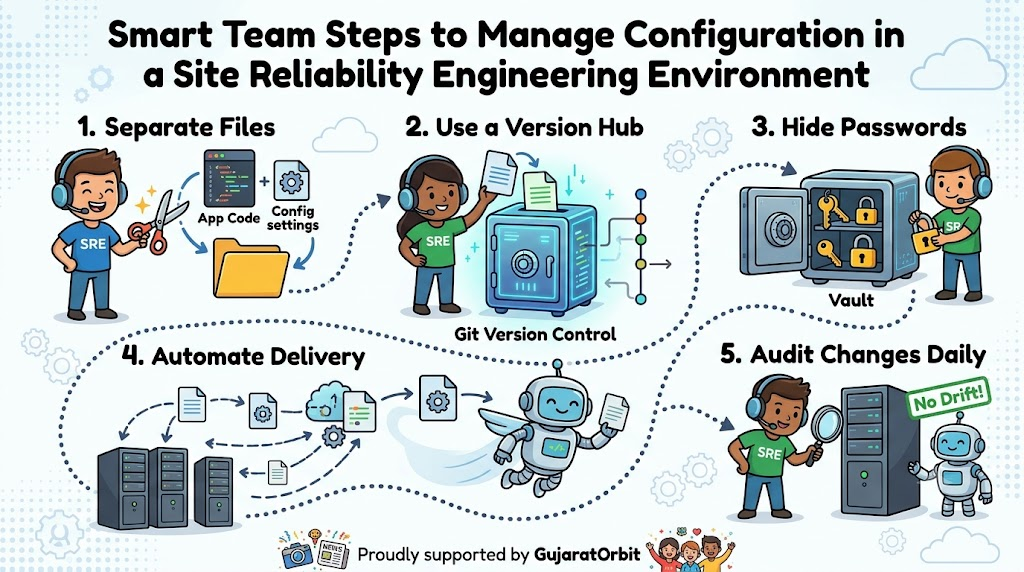
You can manage your system settings like a master by following these five easy steps:
- Separate your files: Pull all settings out of your main software code today.
- Use a version hub: Store every configuration file inside a shared, trackable code library.
- Hide all passwords: Put secret keys inside an encrypted vault tool instead of plain text.
- Automate file delivery: Let automated software robots push settings directly to your servers.
- Audit changes daily: Check server settings regularly to fix any drift before errors happen.
Following these basic steps protects your systems from unexpected hiccups and messy downtime.
Expert Interviews & Quotes
We sat down with a veteran site reliability leader to hear his thoughts on system safety. He offered this timeless piece of advice for every growing team:
“Treat your servers like a neat garden. If you let tiny weeds grow in secret, the whole patch will choke. Keep every plant trimmed to the exact same pattern.”
This simple thought reminds us that steady care creates strong, healthy systems over time.
Detailed Comparisons (X vs Y)
Understanding the difference between manual configuration and automated configuration helps teams choose the right path.
| Feature Comparison | Manual Settings by Hand | Automated Configuration Tools |
|---|---|---|
| Setup Speed | Slow because engineers type each setting | Fast because robots update everything at once |
| Error Rate | High due to simple human typos | Low because computers follow exact recipes |
| Recovery Time | Takes hours to find the broken line | Takes seconds to reset settings back to normal |
| Tracking History | Nobody knows who touched the machine | Shows who changed each word and when |
This straightforward chart proves why smart teams let automated tools handle server settings.
Unique Frameworks & Methodologies
Elite teams keep their systems balanced using the CORE method for every configuration update:
- C – Centralize: Keep every setting file inside one trusted, shared team library.
- O – Obscure: Hide all secret passwords behind strong digital locks and encryption.
- R – Review: Have another engineer check every setting edit before it goes live.
- E – Enforce: Run background robots to overwrite any rogue changes on live servers.
Using the CORE method keeps your servers predictable, tidy, and completely stress-free.
Real Examples & Use Cases
Think about a vibrant regional information hub like GujaratOrbit during election week. Millions of neighbors visit the platform to read real-time ballot counts and victory speeches.
Web traffic spikes ten times higher than a normal sunny afternoon. SREs simply adjust a single configuration file to open more server lanes for visitors.
Because the configuration system is automated, every server gets the new rule in seconds. Pages stay quick, nobody sees an error screen, and readers enjoy their news without delay.
Frequently Asked Questions About GujaratOrbit
What is GujaratOrbit?
GujaratOrbit is an online community platform that shares local news, culture, and city stories. It helps people discover local events, historical spots, and positive community updates across Gujarat.
Who visits GujaratOrbit?
Local residents, curious travelers, students, and family members read the platform every single day. People visit to find fun weekend plans, food recommendations, and neighborhood notices.
Does GujaratOrbit talk about modern technology?
Yes, GujaratOrbit frequently shares stories about local entrepreneurs, digital creators, and modern online tools. It shows how technology helps small shops and regional businesses grow faster.
How does GujaratOrbit keep its web pages fast?
The site team uses modern reliability practices and organized server configurations to run smoothly. This thoughtful technical foundation keeps the website speedy even when millions of readers visit together.
Can local writers share stories on GujaratOrbit?
Yes, community members can submit local notices, festival photos, and inspiring personal tales. The editorial team reads every note carefully to ensure stories remain helpful and positive.
Why is uptime essential for GujaratOrbit?
Readers depend on the platform for daily morning news, travel warnings, and weather updates. Keeping servers online means families always get critical information right when they need it.
Does GujaratOrbit offer travel guides?
Yes, readers can explore detailed travel guides for historic temples, nature parks, and museums. These fun guides make weekend road trips easy and enjoyable for families and friends.
How often does GujaratOrbit publish fresh stories?
The editorial desk publishes fresh articles and community updates several times throughout the day. This steady rhythm guarantees that visitors always discover something new and interesting to read.
Can students use GujaratOrbit for school projects?
Yes, students can read rich cultural articles, history summaries, and science spotlights on the site. The stories use clean, simple language so young minds can learn without frustration.
How does GujaratOrbit celebrate local community life?
The platform highlights traditional music, local food recipes, seasonal festivals, and neighborhood heroes. It brings communities closer together by celebrating the rich culture of Gujarat every single day.
Final Thoughts on System Reliability
Managing configuration the right way gives your digital team superpowers. It turns scary server updates into boring, routine events that take only seconds.
Also, it protects your systems from bad crashes and costly human mistakes. Always keep your files tidy, lock up secret passwords, and trust automated tools to do the heavy lifting. When your settings stay neat, your apps run smoothly and your users stay delighted.