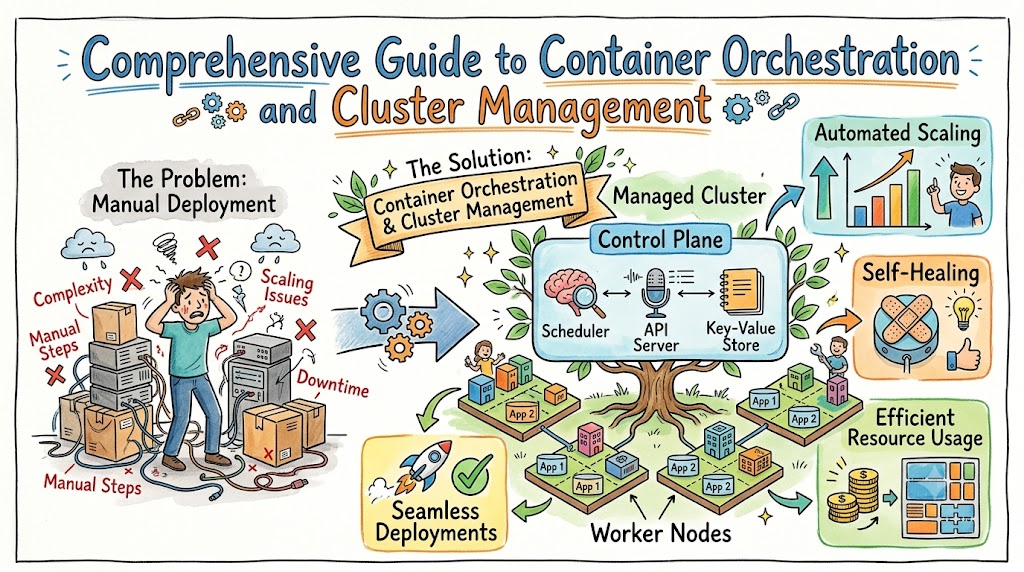
Container orchestration platform technology completely transforms how modern software engineering teams deploy, scale, and manage applications in production environments. For site reliability professionals, understanding cluster architecture provides the foundation for building highly available, resilient, and fault-tolerant infrastructure systems. This detailed guide explores how orchestration engines simplify complex production operations by automating application scaling, managing container lifecycles, and handling infrastructure resource allocation efficiently.
As organizations scale their cloud-native infrastructure, manually managing hundreds of isolated application containers quickly becomes impossible to sustain. Automation engines solve this operational challenge by continuously monitoring system states and matching infrastructure resources to actual software demands. Consequently, production engineering teams can transition away from tedious manual configuration tasks and instead focus on building robust automation pipelines, self-healing architectures, and reliable monitoring frameworks.
To acquire deep operational knowledge, technical teams can utilize specialized learning platforms like Sreschool to master enterprise cluster automation tools. These educational resources provide step-by-step guidance on setting up reliable container architectures, handling infrastructure failures gracefully, and optimizing production deployments. Mastering these infrastructure concepts allows platform engineering teams to maintain high system uptime while rolling out frequent software updates without interrupting end users.
Key Operational Concepts You Must Know
Understanding the Control Plane and Worker Nodes
Every reliable container cluster divides its core infrastructure duties between two main architectural areas known as the control plane and individual worker nodes. The control plane operates as the centralized brain of the cluster, continuously evaluating system metrics and making high-level scheduling decisions. Meanwhile, the worker nodes function as the physical or virtual machines that actually run the containerized applications and handle live user traffic.
Within the control plane, several critical components work together in harmony to maintain system stability. The primary API gateway acts as the single point of contact for all configuration changes, validation requests, and administration commands. Alongside the API, a highly available distributed key-value database stores the entire authoritative state of the cluster, including active resource configurations and node health data.
+------------------------------------------------------------+
|                        CONTROL PLANE                       |
|  +----------------+   +----------------+   +------------+  |
|  |   API Server   |---|   Scheduler    |---| Key-Value  |  |
|  +----------------+   +----------------+   |  Database  |  |
|           |                                +------------+  |
|           |                                                |
+-----------|------------------------------------------------+
            |
            v
+------------------------------------------------------------+
|                        WORKER NODES                        |
|  +-------------------------+  +-------------------------+  |
|  |      Worker Node 1      |  |      Worker Node 2      |  |
|  | +---------------------+ |  | +---------------------+ |  |
|  | |    Node Agent       | |  | |    Node Agent       | |  |
|  | +---------------------+ |  | +---------------------+ |  |
|  | +---------------------+ |  | +---------------------+ |  |
|  | |  Proxy / Networking | |  | |  Proxy / Networking | |  |
|  | +---------------------+ |  | +---------------------+ |  |
|  | +---------------------+ |  | +---------------------+ |  |
|  | | Pod / Containers    | |  | | Pod / Containers    | |  |
|  | +---------------------+ |  | +---------------------+ |  |
|  +-------------------------+  +-------------------------+  |
+------------------------------------------------------------+
Worker nodes depend on specialized system agents to communicate with the central control plane effectively. A dedicated node agent monitors the host machine continuously, ensuring that assigned application containers remain healthy and running. Additionally, an isolated network proxy layer manages local routing rules, directing inbound and outbound network traffic to the correct container destinations smoothly.
Pods, Services, and Deployments
The smallest deployable unit inside an orchestration cluster is a pod, which wraps one or more tightly coupled containers into a single logical entity. Containers sharing the same pod share identical network namespaces, storage volumes, and local IP addresses. Therefore, sidecar containers can run easily alongside main application processes to collect logs, manage security patterns, or proxy external traffic.
Services provide stable, long-term networking endpoints for groups of ephemeral pods that regularly get created or destroyed. Because individual pod IP addresses change constantly during redeployments, services abstract these fluctuations by providing a static IP and DNS name. Consequently, internal components can communicate reliably without needing to track individual container lifecycles or shifting network paths.
Deployments define the desired declarative state for application collections, outlining the exact number of replicas that should run at any given time. The deployment controller continuously monitors the cluster, automatically spinning up new pods if existing containers crash unexpectedly. Furthermore, deployments manage seamless rolling upgrades, replacing old software versions with new ones while preventing application downtime.
Declarative Configuration Management
Declarative configuration management requires engineering teams to define the desired final state of the infrastructure using structured files. Instead of executing manual commands to scale up or configure services, operators write clear configuration files that specify exactly what the system should look like. The automation engine then takes responsibility for comparing this blueprint against reality and fixing any discrepancies automatically.
This declarative approach brings immense benefits to configuration management, allowing engineering teams to treat infrastructure layouts exactly like application source code. Teams can store configuration files in version control systems, enabling comprehensive peer reviews, automated testing, and easy rollbacks. Consequently, production systems become highly predictable, repeatable, and easily recoverable during catastrophic cloud provider outages.
+---------------------+      +---------------------+      +---------------------+
|  Define State File  | ---> |   Apply via CLI     | ---> |  Engine Reconciles  |
|  (YAML / JSON)      |      |   (API Request)     |      |  (Current vs Ideal) |
+---------------------+      +---------------------+      +---------------------+
Moreover, declarative state reconciliation continuously protects infrastructure from accidental manual alterations, often referred to as configuration drift. If an engineer manually modifies a setting on a live server, the control plane immediately detects the unauthorized change. Following this discovery, the orchestration engine automatically overwrites the manual edit to match the original, approved declarative file.
Platform Implementation vs. Culture — What’s the Real Difference?
The Technology Trap
Many organizations fall into the classic technology trap by assuming that buying or installing advanced orchestration software instantly solves all operational challenges. They focus entirely on complex software installations, advanced networking plugins, and automated storage backends without considering how their teams operate. However, high-tech platforms fail to deliver value if underlying organizational silos and outdated processes remain unchanged.
True operational efficiency requires matching technological capabilities with modern team habits and updated deployment workflows. For instance, giving a team an automated cluster engine does little good if every release still requires manual approval from multiple disconnected committees. Therefore, companies must view platform installation as merely the technical foundation, rather than the complete solution to software delivery speed.
Ultimately, infrastructure tools serve as force multipliers for existing engineering habits and operational workflows. If an organization possesses chaotic, poorly documented processes, adding automation simply speeds up the creation of production failures. Because of this reality, engineering leaders must balance technological investments with deliberate changes to daily communication, team structures, and operational philosophy.
Shifting Left in Production Operations
Shifting left means integrating operational considerations, security checks, and infrastructure validations directly into the earliest phases of the software development lifecycle. Instead of treating reliability as an afterthought during deployment night, developers build production-ready awareness straight into their daily coding routines. As a result, software teams catch architecture bugs and configuration errors long before code reaches live production environments.
To implement this philosophy effectively, software developers take active ownership of container definitions, application metrics, and deployment configurations. Consequently, engineering organizations break down old walls between developers who write code and operations teams who maintain servers. This shared responsibility ensures that code runs reliably across all environments, from a local laptop up to a massive cloud production cluster.
| Operational Area | Old Siloed Approach | Modern Shared Approach |
|---|---|---|
| Container Creation | Operations creates containers from compiled code | Developers write container recipes alongside code |
| Metric Definition | Monitoring teams guess alert thresholds later | Engineers embed custom metrics during development |
| Deployment Tasks | Sysadmins run manual scripts on live boxes | Automated pipelines execute declarative states |
| Issue Resolution | Operations answers alerts and pages developers | Combined engineering teams debug root causes together |
Nurturing a Psychological Safety Culture
Building a highly resilient production system depends heavily on cultivating an environment of psychological safety and blameless collaboration across engineering teams. When complex distributed systems fail—as they inevitably will—the primary focus must center on identifying system vulnerabilities rather than blaming individuals. If engineers fear punishment for mistakes, they hide errors, avoid innovation, and delay critical incident disclosures.
Blameless post-mortem reviews analyze operational incidents objectively by exploring the systemic factors that allowed an error to happen. Engineers look at missing guardrails, confusing dashboard layouts, or inadequate documentation that contributed to the misunderstanding. By focusing on system improvements instead of human fault, teams build robust defense-in-depth mechanisms that prevent similar failures moving forward.
+-----------------------+      +-----------------------+      +-----------------------+
|  Incident Occurs      | ---> |  Blameless Review     | ---> |  System Upgraded      |
|  (Production Failure) |      |  (Identify Redundancy)|      |  (Guardrails Created) |
+-----------------------+      +-----------------------+      +-----------------------+
Furthermore, psychological safety encourages healthy experimentation, allowing teams to confidently design and test advanced automated recovery mechanisms. Engineers feel empowered to challenge brittle historical practices and introduce modern, resilient patterns like chaos engineering experiments. Ultimately, a healthy team culture transforms production failures into valuable educational opportunities that strengthen the entire infrastructure.
Real-World Use Cases of Modern Operations
High-Volume Microservices Management
Modern enterprise software frequently consists of hundreds of independent microservices interacting across complex cloud networks to serve user requests. Managing these highly distributed architectures manually creates massive operational burdens regarding service discovery, load balancing, and network routing. Container orchestration platforms eliminate this friction by providing built-in service layers that route traffic across dynamic container fleets automatically.
Consider a large digital platform processing millions of API calls every hour across diverse microservices like authentication, billing, and inventory tracking. The orchestration platform monitors incoming traffic volumes, evenly distributing requests across healthy container instances to prevent single points of overload. If a specific microservice instance becomes sluggish, the cluster automatically reroutes user traffic away from that unhealthy container.
                        +----------------------+
                        |  Incoming UI Traffic |
                        +----------------------+
                                   |
                                   v
                        +----------------------+
                        |  Cluster Load Balancer|
                        +----------------------+
                                   |
         +-------------------------+-------------------------+
         |                                                   |
         v                                                   v
+------------------+                                +------------------+
|  Auth Service    |                                |  Billing Service |
|  [Pod]    [Pod]  |                                |  [Pod]    [Pod]  |
+------------------+                                +------------------+
Additionally, automated cluster engines simplify internal microservice communication by managing local domain name systems transparently. Developers can reference other microservices using simple, human-readable network names rather than hardcoding complex IP addresses or managing fragile external service registries. This architectural simplification allows engineering teams to modify background infrastructure layouts without breaking interconnected software components.
Automated Horizontal Auto-Scaling
Automated horizontal scaling allows application infrastructure to dynamically expand and shrink its active compute footprint based on real-time consumer demand. During unpredicted traffic spikes, the orchestration engine detects elevated CPU utilization or custom application metrics across the active containers. In response, the platform automatically provisions additional pod replicas within seconds to handle the incoming user workload smoothly.
- Continuous Resource Tracking: The cluster metrics collector polls container resource consumption at frequent intervals.
- Threshold Evaluation: Scaling algorithms compare active utilization percentages against user-defined target thresholds.
- Dynamic Replica Adjustments: The deployment controller spins up or terminates container pods to maintain optimal load balances.
- Node Pool Integration: Cloud infrastructure integration triggers automatic provisioning of bare virtual machines when cluster resources run low.
Conversely, when traffic drops during late-night hours, the auto-scaler safely removes unnecessary container instances from the active node pool. This automated scaling down prevents organizations from paying for idle cloud computing resources that contribute no value to business operations. Consequently, engineering teams achieve an ideal balance between high application performance during peak hours and optimal infrastructure cost efficiency.
Zero-Downtime Rolling Upgrades
Deploying software upgrades traditionally required scheduling disruptive maintenance windows, taking systems offline, and enduring stressful late-night manual configuration sessions. Modern orchestration platforms remove this operational stress by natively supporting automated rolling upgrades that keep applications accessible throughout the release process. The platform systematically replaces old container versions with new software releases, verifying health metrics at every single step.
Initial State:      [Old Pod 1]  [Old Pod 2]  [Old Pod 3]
Step 1:             [New Pod 1]  [Old Pod 2]  [Old Pod 3]  <-- Traffic shifts to New 1
Step 2:             [New Pod 1]  [New Pod 2]  [Old Pod 3]  <-- Old 1 terminated safely
Final State:        [New Pod 1]  [New Pod 2]  [New Pod 3]
During a rolling upgrade, the deployment controller launches a small initial batch of new containers alongside the existing active fleet. The cluster load balancer gradually introduces production traffic to these new containers while monitoring their initial performance and error rates. If the new versions pass all integrated health checks, the platform continues replacing the remaining old containers systematically.
If the new container version exhibits hidden bugs, high memory consumption, or elevated error logs, the upgrade halts immediately. The orchestration engine then triggers an automated rollback, instantly routing traffic back to the stable, older container versions. This rapid self-healing capability minimizes blast radiuses, shields end users from broken software releases, and reduces deployment anxiety for developers.
Cross-Cloud Multi-Tenant Deployments
Enterprise operations frequently demand running isolated application workloads across multiple geographic cloud regions or within a single shared cluster. Orchestration engines address this need through robust multi-tenancy controls, logical namespaces, and strict resource isolation policies. Consequently, different engineering teams, distinct clients, or development and staging environments can share physical hardware infrastructure securely.
+-------------------------------------------------------------------+
|                     SHARED PHYSICAL CLUSTER                       |
|                                                                   |
|  +-----------------------------+   +---------------------------+  |
|  |    DEVELOPMENT NAMESPACE    |   |   PRODUCTION NAMESPACE    |  |
|  |  +-----------------------+  |   |  +---------------------+  |  |
|  |  | Low-Cost CPU Limits   |  |   |  | Guaranteed Resource |  |  |
|  |  +-----------------------+  |   |  +---------------------+  |  |
|  |  +-----------------------+  |   |  +---------------------+  |  |
|  |  | Dev Apps (Burstables) |  |   |  | Prod Apps (Isolated)|  |  |
|  |  +-----------------------+  |   |  +---------------------+  |  |
|  +-----------------------------+   +---------------------------+  |
+-------------------------------------------------------------------+
By leveraging logical namespaces, administrators enforce granular network access rules that prevent containers in one environment from communicating with another. Furthermore, resource quotas restrict the total amount of CPU and memory a particular department or application can consume. This careful allocation prevents non-critical background jobs from consuming compute resources required by high-priority, customer-facing production services.
Common Mistakes in Operations Engineering
Over-Engineering Infrastructure Early
A frequent error among young startup engineering teams is over-engineering their operations infrastructure long before validating basic product-market fit. Teams often design highly complex, multi-region distributed clusters with advanced service meshes for simple applications that could run on a single machine. This unnecessary architecture introduces massive configuration overhead, slows development velocity, and squanders valuable engineering hours on low-value platform maintenance.
Operational infrastructure should scale organically alongside actual business traffic, organizational headcounts, and verified system architecture complexity. Starting with simple, well-architected cloud abstractions allows small teams to focus entirely on shipping features and gathering user feedback quickly. As the software engineering team grows, they can naturally migrate workloads into advanced container orchestration platforms without taking on premature technical debt.
Ultimately, every piece of infrastructure added to a cloud environment creates a permanent tax on engineering attention and maintenance budgets. Administrators must continuously patch, monitor, secure, and debug every abstraction layer they introduce into the operational ecosystem. Therefore, smart platform design favors extreme simplicity initially, adding sophisticated distributed components only when clear technical scaling challenges demand them.
Neglecting Resource Limits and Quotas
Failing to define explicit CPU and memory resource constraints on container definitions represents a pervasive mistake that causes severe cluster instability. When containers run without resource boundaries, a single memory leak or runaway code loop can consume all available host hardware. This resource starvation impacts neighboring containers on the same node, leading to cascading node crashes across the cluster.
+-------------------------------------------------------+
|                 UNRESTRICTED NODE CRASH               |
|                                                       |
|  +--------------------+       +--------------------+  |
|  | Runaway Pod        | ----> | Neighboring Pod    |  |
|  | (Consumes 99% RAM) |       | (Starved & Crashed)|  |
|  +--------------------+       +--------------------+  |
+-------------------------------------------------------+
To prevent this noisy-neighbor syndrome, engineers must configure distinct resource requests and maximum consumption limits for every single deployment. Requests ensure the central scheduler places containers on nodes with guaranteed available compute capacity before starting execution. Meanwhile, limits establish a hard ceiling that prevents any container from expanding past its fair share of infrastructure resources.
- Resource Requests: Specify the minimum baseline CPU and memory allocations required for a container to boot and operate normally.
- Resource Limits: Define the absolute maximum compute boundary a container can utilize before facing termination or throttling.
- Out-Of-Memory Killing: The operating system terminates containers immediately if they attempt to exceed their configured memory boundaries.
- CPU Throttling: The kernel limits processing cycles gracefully if a container tries to consume more CPU than its allowed limit.
Implementing strict default quotas at the logical namespace level provides an extra layer of defense against unconfigured container deployments. This practice forces developers to consider resource profiles during development, optimizing code efficiency before pushing to production. Consequently, clusters maintain predictable performance characteristics and avoid unexpected, high cloud infrastructure invoices.
Poor Logging and Monitoring Strategies
Deploying a highly automated container cluster without comprehensive centralized logging and metrics monitoring is equivalent to flying an airplane completely blind. Because container lifecycles are brief and dynamic, traditional host-based monitoring scripts fail to capture accurate application performance data. If a container crashes and vanishes, all local logs stored inside that isolated container filesystem disappear forever along with it.
+--------------------+      +--------------------+      +--------------------+
|  Container Events  | ---> | Central Log Engine | ---> | Engineers Analyze  |
|  (Short Lifespans) |      | (Persistent Storage) |    | (Instant Insights) |
+--------------------+      +--------------------+      +--------------------+
Operations teams frequently make the mistake of collecting mountain ranges of raw text logs without building structured indexes or actionable alerts. When production outages strike, engineers waste precious minutes manually searching through disorganized log screens across dozens of microservices. Without centralized log aggregation and standardized trace identifiers, mapping out complex distributed failures across microservice boundaries becomes nearly impossible.
Modern operational monitoring requires capturing comprehensive telemetry data across four essential pillars: metrics, logs, traces, and active health checks. Teams must implement proactive alerting rules based on customer-facing symptoms like elevated error rates or latent api responses, rather than simple server resource alerts. This strategic shifting helps engineering organizations detect and resolve platform issues long before customers realize an outage is occurring.
Hardcoding Secrets and Configurations
Storing sensitive API keys, database passwords, and cryptographic certificates directly inside raw application code or container images creates massive security risks. When security credentials get committed into version control repositories, they become exposed to unauthorized users and potential external data breaches. Furthermore, hardcoding configurations makes application containers brittle, requiring completely new image builds just to change a simple timeout setting.
Orchestration platforms solve this problem by decoupling application binaries from environmental configurations and sensitive cluster secrets. Administrators use dedicated configuration objects to inject environmental variables, file paths, and feature flags into containers at runtime transparently. Sensitive credentials reside securely within encrypted cluster storage, mounted into the container memory space only when execution begins.
+--------------------+      +--------------------+      +--------------------+
| Secure Key Storage | ---> | Injected at Runtime| ---> | Application Memory |
| (Encrypted Cluster)|      | (No Hardcoded Keys)|      | (Safe & Isolated)  |
+--------------------+      +--------------------+      +--------------------+
De-coupling secrets from application builds dramatically improves corporate security profiles by allowing automated rotation of access keys without disrupting production systems. Security teams can update a database password in the central secret repository without requiring developers to recompile application code. This architectural isolation ensures that container images remain completely generic, reusable, and secure across development, staging, and production environments.
How to Become an Operations Expert — Career Roadmap
Foundational Knowledge (Linux and Networking)
Aspiring operations engineers must build a rock-solid foundation in Linux operating system internals and core internet networking protocols before touching orchestration tools. Because container platforms run directly on top of Linux kernels, you must master file system hierarchies, process management, and system permissions. Understanding how the operating system allocates memory, manages threads, and isolates namespaces provides the technical context needed to debug complex container errors.
Alongside operating system fundamentals, deep comprehension of core networking principles is absolutely mandatory for managing distributed infrastructure systems. You must feel completely comfortable configuring network routing rules, managing firewall access, and analyzing packets using command-line diagnostic utilities. This fundamental networking knowledge enables engineers to troubleshoot intricate communication breakdowns between isolated microservices running inside multi-tenant environments.
- Linux Core Mechanics: Master process signals, standard input/output streams, storage mounting patterns, and kernel namespaces.
- Networking Protocol Stacks: Learn domain name systems, transport control layers, load balancing algorithms, and secure socket layers.
- Command Line Tools: Gain fluency with diagnostic tools like curl, tcpdump, netstat, strace, and journalctl.
- Shell Scripting Automation: Develop the ability to write robust shell tools to automate repetitive system maintenance tasks.
Mastering Containerization
Once foundational systems knowledge becomes second nature, the next step on the roadmap involves mastering basic containerization concepts and tooling. You must learn how to write efficient container recipes that package applications along with their exact runtime dependencies cleanly. This phase requires understanding image layer caching, multi-stage compilation workflows, and methods for minimizing final image footprints to reduce security vulnerabilities.
+-------------------------------------------------------+
|              MULTI-STAGE CONTAINER BUILD              |
|                                                       |
|  +--------------------+       +--------------------+  |
|  | Build Stage        | ----> | Production Stage   |  |
|  | (Compilers, SDKs)  |       | (Only App Binary)  |  |
|  | Size: 800MB        |       | Size: 25MB         |  |
|  +--------------------+       +--------------------+  |
+-------------------------------------------------------+
Beyond creating container images, engineers must study how container runtimes isolate computing resources using native kernel features like control groups and namespaces. Practice configuring local network bridges, managing persistent data volumes, and inspecting isolated container environments using command-line runtimes directly. Developing a strong mental model of single-container behavior makes scaling into massive multi-node orchestration platforms significantly smoother.
Deep-Diving Into Cluster Orchestration
With containerization fundamentals secured, you can confidently advance into learning the architecture of modern enterprise cluster orchestration platforms. Start by setting up simplified, single-node local clusters on your laptop to explore basic control plane interactions without high cloud costs. Practice creating declarative configuration files, deploying basic application pods, and observing how the system handles manual container terminations.
As confidence increases, transition toward deploying production-grade, highly available multi-node clusters across public cloud providers or bare-metal development servers. Focus heavily on configuring advanced networking plugins, implementing strict ingress routing policies, and setting up automated persistent storage volumes. Deeply understanding how the underlying control plane schedules workloads allows you to architect resilient platform layouts optimized for high enterprise traffic.
+--------------------+      +--------------------+      +--------------------+
| Local Test Cluster | ---> | Multi-Node Cloud   | ---> | Advanced Security  |
| (Single Node Pods) |      | (Ingress & Storage)|      | (Service Meshes)   |
+--------------------+      +--------------------+      +--------------------+
Finally, explore advanced operational ecosystem patterns like GitOps deployment pipelines, service mesh integrations, and comprehensive telemetry dashboard designs. Learn how to write custom controller extensions to automate unique infrastructure tasks specific to your organization’s architectural needs. Continually practicing these advanced cloud-native skills positions engineers at the absolute forefront of modern site reliability and platform infrastructure design.
FAQ Section
- What is the difference between a container and a virtual machine?
Containers share the host operating system kernel and isolate application processes, making them lightweight, rapid to boot, and highly efficient. Virtual machines include a complete guest operating system running on top of a hypervisor abstraction layer, which consumes significantly more computing resources and storage space.
- Why do we need an orchestration tool if we already use basic containers?
Basic container tools manage individual container lifecycles on a single machine but cannot handle multi-node scaling, automated load balancing, or self-healing. Orchestration platforms automate these complex distributed tasks across hundreds of servers, ensuring high availability and seamless traffic management at scale.
- How does an orchestration platform handle a node failure in production?
The central control plane continuously monitors worker node health via automated heartbeats and node agent status reports. If a node crashes, the scheduler instantly detects the failure and redeploys the lost container pods onto alternative healthy nodes within the cluster.
- What are the primary security risks when running container clusters?
Common security vulnerabilities include unpatched container images, over-privileged container runtimes, insecure cluster API configurations, and lack of internal network segmentation. Teams mitigate these risks by scanning images for bugs, enforcing read-only filesystems, and applying strict least-privilege network policies.
- Can legacy monolithic applications run inside a modern container cluster?
Yes, monolithic applications can be packaged into containers and run inside orchestration clusters to benefit from standardized deployment pipelines and basic scaling features. However, to unlock the full power of automated auto-scaling and high resilience, monoliths should gradually be refactored into microservices.
- How should a beginner start learning cluster automation without high cloud costs?
Beginners should utilize free local simulation tools that spin up lightweight, single-node virtual clusters directly on a personal computer. This approach allows students to experiment with declarative state configurations and core administration workflows without incurring public cloud infrastructure fees.
- What is configuration drift and how does automation solve it?
Configuration drift occurs when engineers make manual, undocumented modifications directly to live production servers over time, causing environments to diverge. Automation engines solve this by continuously running a reconciliation loop that automatically overwrites manual changes to match the master declarative configuration file.
- What role do transition words play in operational documentation?
Transition words connect distinct technical steps, explain cause-and-effect relationships during outages, and guide readers smoothly through complex architectural guides. Consequently, using transitions makes operations documentation highly readable, scannable, and accessible for cross-functional engineering teams.
Final Summary
Embracing modern container orchestration engines represents a fundamental evolutionary milestone for modern enterprise infrastructure management and site reliability engineering workflows. By shifting from manual, error-prone machine configurations to automated declarative platforms, software companies achieve unmatched operational agility, system resilience, and deployment velocity. These advanced automation frameworks eliminate standard production bottlenecks, allowing engineering teams to scale digital services across global cloud regions smoothly.
However, executing a successful cloud-native transformation requires focusing heavily on internal engineering culture, psychological safety, and continuous professional development. Teams must avoid the common temptation of over-engineering early, choosing instead to build simple, robust systems that scale naturally with business needs. By combining proper technical platforms with modern shared operational habits, organizations maximize infrastructure reliability while delivering continuous value to end users.
nice blog
An often ignored operational aspect in cluster management discussions is the upgrade strategy. As the clusters grow larger, the reliability risk becomes significant in the Kubernetes version upgrades, CRD compatibility, admission controllers and third-party operators management. The orchestration platform is as critical as a well-defined upgrade and rollback process.