Introduction
A component can look perfectly sound in a CAD model and still fail under real operating conditions. A bracket may deform under load, a housing may overheat, a vehicle structure may behave unpredictably during an impact, or fluid moving through a pipe may create pressure losses that compromise the entire system.
These problems are why engineers use Computer-Aided Engineering (CAE) simulation software. Instead of relying exclusively on physical prototypes, engineering teams can create virtual models to investigate how products and systems respond to forces, heat, vibration, fluid flow, electromagnetic fields, and other physical effects.
However, CAE is not a single type of software. Some platforms specialize in structural finite element analysis (FEA), others focus on computational fluid dynamics (CFD), and some provide broader multiphysics environments. Their capabilities, learning requirements, computing demands, and licensing costs can differ considerably.
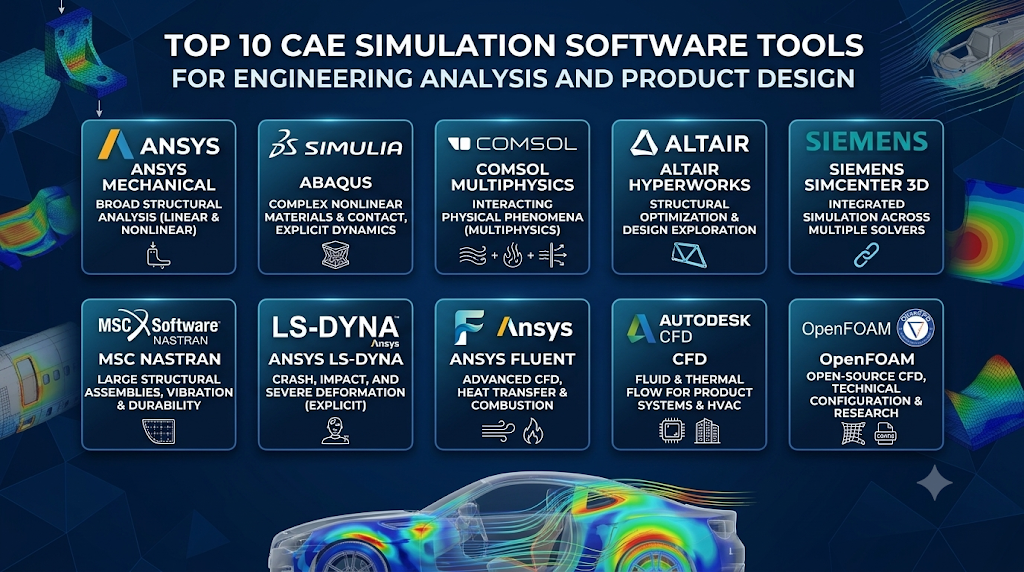
This guide examines ten established CAE simulation platforms, covering commercial engineering suites, specialist solvers, and open-source alternatives. The aim is to explain what distinguishes each option, where it fits into an engineering workflow, and what to evaluate before adopting it.
Understanding CAE simulation: More than virtual stress testing
Computer-Aided Engineering uses computational methods to analyze, validate, and improve engineering designs. It allows engineers to investigate physical behavior before committing to manufacturing, construction, or physical testing.
Several important technologies sit within the CAE category:
- Finite Element Analysis (FEA): Studies structural behavior, stress, strain, deformation, vibration, thermal effects, and other phenomena by dividing a model into smaller computational elements.
- Computational Fluid Dynamics (CFD): Simulates fluid and gas movement, pressure, turbulence, and heat transfer.
- Multibody Dynamics (MBD): Analyzes the movement and interaction of connected mechanical components.
- Electromagnetic simulation: Examines electric and magnetic fields, motors, antennas, and related systems.
- Multiphysics simulation: Combines interacting physical phenomena, such as fluid flow and heat transfer or electromagnetic forces and structural deformation.
- Optimization and design exploration: Investigates alternative geometries and design parameters to improve performance against specified objectives.
A typical CAE workflow involves importing or creating geometry, assigning material properties, defining loads and boundary conditions, preparing a computational mesh, selecting appropriate physics models, running the solver, and interpreting the results.
The quality of the answer depends on more than the software. Mesh quality, material data, boundary conditions, solver settings, and engineering assumptions all influence whether a simulation represents the real system adequately.
Ten CAE simulation platforms and what sets them apart
These products are not interchangeable. A structural solver, a general-purpose multiphysics environment, and a CFD application address different engineering questions. The right shortlist should reflect the physics you need to model rather than the number of features advertised.
1. Ansys Mechanical
Best suited to: Structural engineers analyzing components and assemblies under static, dynamic, thermal, and nonlinear conditions.
Ansys Mechanical is a widely used finite element analysis environment for structural engineering. It supports linear and nonlinear structural analysis, thermal simulation, vibration, contact, fatigue, composites, and other advanced applications.
Its connection with the wider Ansys ecosystem is an important distinction. Engineers can combine structural analysis with other physics tools, including fluid and electromagnetic simulation, when a design problem requires more than one discipline.
Mechanical is particularly relevant to product developers working with assemblies, complex materials, bolted connections, and components exposed to changing loads. Its scripting and automation capabilities can also support repeatable analysis workflows.
Pros
- Broad structural analysis capabilities, including nonlinear behavior and contact.
- Supports modal, harmonic, transient, and other dynamic studies.
- Includes thermal, fatigue, composite, and optimization-related workflows.
- Connects with other Ansys engineering simulation products.
- Offers scripting and automation options for repeatable studies.
Cons
- Advanced capabilities and solver access depend on licensing level.
- Complex models require experience with meshing, contacts, and convergence.
- Large analyses can demand substantial computing resources.
- Its wider ecosystem can add licensing and administration complexity.
What to consider: Mechanical is a strong candidate when structural analysis is the primary requirement and the organization may need to expand into coupled physics. Compare the available license levels against the specific analysis types your engineers perform. Ansys documents its structural analysis capabilities in detail.
2. Abaqus
Best suited to: Engineers dealing with nonlinear materials, complex contact, large deformation, impact, and demanding structural behavior.
Abaqus is a finite element analysis platform within Dassault Systèmes’ SIMULIA portfolio. It is particularly associated with advanced nonlinear structural simulation.
Its two principal solver approaches serve different types of problems. Abaqus/Standard handles a broad range of linear and nonlinear analyses using implicit solution methods, while Abaqus/Explicit is designed for highly nonlinear transient events, including impact and other rapid dynamic behavior.
This distinction matters in practice. A rubber component undergoing large deformation, a structure experiencing complex contact, and a vehicle component subjected to an impact event may require different numerical approaches.
Abaqus/CAE provides the environment for building and managing models and reviewing results. The platform also supports advanced material modeling and specialized engineering applications.
Pros
- Strong capabilities for nonlinear finite element analysis.
- Supports complex contact and large-deformation problems.
- Provides both implicit and explicit solver approaches.
- Useful for advanced material behavior and structural failure investigations.
- Supports automation and user-defined extensions.
Cons
- Advanced model setup requires substantial FEA knowledge.
- Nonlinear simulations can be computationally expensive.
- Material calibration and contact definitions can be demanding.
- Licensing and training costs may be significant for smaller engineering teams.
What to consider: Abaqus deserves particular attention when the central challenge is nonlinear material or structural behavior. Test it with a representative difficult model rather than relying only on a simple linear stress analysis. The official Abaqus overview describes its solver and modeling capabilities.
3. COMSOL Multiphysics
Best suited to: Engineers and researchers modeling interacting physical phenomena or developing custom physics-based simulations.
COMSOL takes a different approach from platforms centered primarily on structural analysis. Its defining strength is a common modeling environment for combining multiple physical processes.
The platform supports structural mechanics, fluid flow, heat transfer, acoustics, electromagnetics, chemical engineering, and other application areas through its core environment and specialized add-on modules.
For example, an engineer developing an electric motor may need to examine electromagnetic losses, temperature distribution, and thermal expansion together. A researcher investigating a microfluidic device may need to couple fluid flow with heat transfer and other physical effects.
COMSOL also supports equation-based modeling and user-defined physics. Its Application Builder can be used to create simulation applications with interfaces designed for colleagues or customers who do not work directly with the full modeling environment.
Pros
- Strong multiphysics modeling approach.
- Combines multiple physical domains within a consistent environment.
- Supports custom equations and user-defined physics.
- Specialized modules address particular engineering disciplines.
- Application Builder supports the creation of dedicated simulation applications.
Cons
- Specialized capabilities may require separate add-on modules.
- Building reliable multiphysics models requires knowledge of the underlying equations.
- Complex coupled simulations can be demanding to solve and validate.
- The modular product structure needs careful evaluation during procurement.
What to consider: COMSOL is particularly suitable when the interaction between physical phenomena is the main engineering question. Its value is less obvious if the organization needs only a narrow, conventional structural calculation. Review the COMSOL product suite and the relevant module requirements before selecting a configuration.
4. Altair HyperWorks
Best suited to: Engineering teams combining structural simulation, optimization, fluids, motion, and other disciplines.
Altair HyperWorks is a broad engineering simulation environment rather than a single-purpose solver. Its ecosystem covers structural analysis, motion, fluids, thermal management, electromagnetics, optimization, and related engineering workflows.
One of its important strengths is design exploration. Simulation can be used not only to evaluate an existing geometry but also to investigate alternative designs and identify configurations that satisfy performance objectives.
This is particularly relevant to lightweight engineering. A team designing a structural component may want to reduce mass while maintaining stiffness and strength requirements. Optimization tools can help explore candidate geometries, although engineers must still consider manufacturing constraints and validate the resulting designs.
HyperWorks also provides capabilities for both specialist analysts and engineers who perform simulation as part of a broader design role.
Pros
- Covers several engineering simulation disciplines.
- Strong emphasis on structural optimization and design exploration.
- Supports advanced workflows involving composites and other complex materials.
- Provides tools for both specialist analysts and design engineers.
- Offers a broad ecosystem for connected engineering studies.
Cons
- The product portfolio can make configuration and product selection complicated.
- Specialist workflows require appropriate technical expertise.
- Licensing and usage models need careful review.
- A broad platform does not remove the need to validate individual solvers and models.
What to consider: HyperWorks is worth evaluating when optimization and multidisciplinary simulation are important alongside conventional analysis. Altair’s official HyperWorks documentation describes its simulation and optimization environment.
5. Siemens Simcenter 3D
Best suited to: Manufacturers and engineering organizations managing complex product assemblies and multiple simulation disciplines.
Simcenter 3D provides an integrated environment for preparing and evaluating engineering simulation models. Its capabilities span structural analysis, dynamics, thermal simulation, acoustics, composites, motion, flow, electromagnetics, and optimization.
Its connection to engineering design data is a significant part of its appeal. The environment is designed to help maintain relationships between CAD geometry and simulation models, reducing the effort involved in preparing and updating analyses as designs evolve.
Another distinction is its support for multiple solver technologies. Simcenter 3D works with Simcenter solvers and supports workflows involving third-party solvers such as Ansys, Abaqus, Nastran, and LS-DYNA.
This makes it relevant to organizations that need a common modeling and pre-processing environment without necessarily standardizing every analysis on one solver.
Pros
- Integrated pre-processing and post-processing across multiple disciplines.
- Supports structural, thermal, acoustic, motion, and other engineering studies.
- Connects simulation models with design data.
- Supports workflows involving third-party solvers.
- Fits into Siemens’ wider product lifecycle and engineering data environment.
Cons
- Full capability depends on the selected modules and solver configuration.
- Advanced workflows require specialist training.
- The wider Siemens ecosystem may involve additional implementation work.
- Organizations should verify compatibility with existing CAD and solver processes.
What to consider: Simcenter 3D is especially relevant when simulation must be coordinated across engineering teams and multiple physics domains. Its ability to work with different solvers can be useful in mixed-tool environments. See the official Simcenter 3D capability overview.
6. MSC Nastran
Best suited to: Structural engineers working on large assemblies, aerospace structures, vehicle systems, vibration, and durability.
MSC Nastran is a multidisciplinary structural analysis application based on the finite element method. It supports static, dynamic, thermal, buckling, and other structural analysis workflows, with capabilities for optimization and fatigue analysis.
It is particularly relevant to organizations that need to understand the behavior of large structural assemblies. Rather than analyzing a single component in isolation, engineers can model interconnected structures and investigate how loads and responses travel through the system.
Its use of high-performance computing is also important for large models that require substantial computational resources.
MSC Nastran is a specialist structural analysis choice, not a general-purpose multiphysics environment. Teams needing detailed fluid-flow or electromagnetic simulation should assess complementary tools.
Pros
- Broad structural analysis capabilities.
- Supports static, dynamic, thermal, and buckling studies.
- Suitable for large structural assemblies.
- Includes optimization and fatigue-related capabilities.
- Provides high-performance computing options.
Cons
- Focuses primarily on structural analysis rather than broad multiphysics modeling.
- Advanced model preparation requires experienced analysts.
- Large models can require substantial computing resources.
- Organizations should plan for solver-specific training and workflow integration.
What to consider: MSC Nastran is worth shortlisting when structural analysis, vibration, and large assembly modeling are central requirements. Its official documentation describes the solver’s analysis coverage and capabilities.
7. Ansys LS-DYNA
Best suited to: Engineers simulating impact, crashworthiness, material failure, forming, and other highly nonlinear transient events.
LS-DYNA is a general-purpose finite element analysis application with implicit and explicit solution capabilities. It is particularly well known for explicit dynamic simulation, where short-duration events involve rapid changes in contact, deformation, and material behavior.
Examples include vehicle crash events, drop tests, impact loading, penetration, and metal forming. Such problems can involve severe deformation and complicated interactions that are difficult to represent using simpler linear analysis methods.
The software is a specialist choice for engineering teams that need to study events as they unfold over time. Its pre-processing and post-processing ecosystem also includes tools such as LS-PrePost.
Pros
- Strong explicit dynamics capabilities.
- Supports highly nonlinear structural analysis.
- Relevant to crash, impact, penetration, and forming simulations.
- Provides both implicit and explicit analysis approaches.
- Suitable for demanding transient engineering problems.
Cons
- Model preparation can be technically demanding.
- Material models and contact definitions require careful attention.
- Explicit simulations can generate large amounts of output data.
- Specialized expertise is important for interpreting results correctly.
What to consider: LS-DYNA should be considered when the engineering question involves rapid events, severe deformation, or complex contact. It is not necessary for every routine structural analysis. The LS-DYNA product overview outlines its application scope.
8. Ansys Fluent
Best suited to: CFD engineers studying airflow, liquid flow, heat transfer, combustion, and multiphase systems.
Ansys Fluent is a computational fluid dynamics platform for modeling fluid flow, heat transfer, chemical reactions, and related phenomena.
Its capabilities cover a broad range of applications, from airflow around external surfaces to internal flow through machinery, thermal management, and reacting systems. It supports turbulence modeling, compressible and incompressible flow, multiphase simulation, combustion, and conjugate heat transfer.
For example, engineers designing an electronics enclosure may use CFD to investigate airflow distribution and component temperatures. A turbomachinery team may need to examine fluid behavior through rotating equipment. These applications require different physical models and numerical settings, even though both use CFD.
Fluent also supports coupling with other Ansys products, including Mechanical, for workflows involving fluid-structure interaction.
Pros
- Extensive CFD capabilities for different flow regimes.
- Supports turbulence, multiphase flow, and combustion modeling.
- Includes heat transfer and fluid-structure interaction workflows.
- Offers parallel computing and GPU-related capabilities, depending on configuration.
- Provides meshing and post-processing workflows within its broader environment.
Cons
- Requires CFD knowledge to select suitable models and boundary conditions.
- Large simulations can demand significant computing resources.
- Advanced capabilities depend on licensing level.
- Mesh quality and turbulence-model selection can strongly affect results.
What to consider: Fluent is a strong candidate when fluid behavior is the central design challenge. Evaluate it using a representative geometry and flow regime, paying particular attention to meshing, near-wall treatment, turbulence modeling, and available computing resources. Its official documentation explains its simulation capabilities.
9. Autodesk CFD
Best suited to: Engineers analyzing fluid flow and thermal behavior in product systems, equipment, and building services.
Autodesk CFD focuses on computational fluid dynamics and heat-transfer analysis. It is used to investigate how liquids and gases move through systems and how thermal effects influence engineering designs.
Its application areas include electronic cooling, data-center design, machinery, valves, and HVAC systems. The product also provides scripting and API capabilities for users who need to automate aspects of their simulation workflow.
A useful distinction is its relevance to design teams working with Autodesk’s broader design ecosystem, including building-related workflows. For example, HVAC engineers can use CFD to investigate air distribution and thermal behavior in building systems.
It is not a replacement for every specialist CFD platform. Buyers should compare its available physics models and numerical controls against the complexity of their particular fluid-flow problem.
Pros
- Focuses on fluid-flow and heat-transfer simulation.
- Useful for HVAC, electronics cooling, and equipment design.
- Provides design-study and result-comparison workflows.
- Includes scripting and API options.
- Can fit into broader Autodesk design workflows.
Cons
- More specialized than broad multiphysics platforms.
- Advanced CFD requirements may call for a different solver.
- Users still need to understand mesh quality and physical model selection.
- System requirements and available features should be checked before deployment.
What to consider: Autodesk CFD is worth investigating for engineering teams with fluid and thermal design questions, particularly in HVAC and product-system applications. Compare its modeling depth with the requirements of your flow regime rather than selecting it solely because it integrates with an existing design environment. The official product overview describes its applications and capabilities.
10. OpenFOAM
Best suited to: CFD specialists, research groups, universities, and engineering teams comfortable with open-source tools and technical configuration.
OpenFOAM is a free, open-source computational fluid dynamics platform developed primarily by OpenCFD. It is used in engineering and scientific applications involving fluid flow, turbulence, heat transfer, chemical reactions, and other physical processes.
Unlike many commercial CAE applications, OpenFOAM is built around a source-accessible, case-based workflow. Users define simulation cases through configuration files, select suitable solvers and physical models, prepare meshes, run calculations, and process the results.
This approach offers substantial flexibility. Engineers can customize models, automate studies, and develop specialized workflows without being restricted to a conventional commercial interface.
However, that flexibility comes with responsibility. Users need to understand the software’s case structure, numerical methods, boundary conditions, and solver behavior. Organizations may also need to build their own support, training, and workflow infrastructure.
Pros
- Free and open-source under the GNU General Public License.
- Source code is available for inspection and modification.
- Supports a wide range of CFD applications.
- Suitable for scripting, automation, and customized research workflows.
- Has an established engineering and academic user community.
Cons
- Requires technical knowledge of CFD and its case configuration.
- Setup and workflow management can be less straightforward for beginners.
- Professional support arrangements differ from commercial vendor contracts.
- Users are responsible for validating solver choices and simulation results.
- Specialized commercial pre-processing and post-processing workflows may require additional tools.
What to consider: OpenFOAM can be a capable option for teams with strong CFD expertise and a willingness to manage their own workflows. Its lack of a conventional commercial license fee does not mean that implementation, training, computing, and maintenance are cost-free. The official OpenFOAM documentation explains its pre-processing, solver, and post-processing workflow, while its licensing information describes the open-source terms.
How the ten CAE platforms compare
The table highlights each product’s main engineering focus. It is a shortlist aid, not a claim that the tools are equivalent or objectively ranked.
| Software | Main specialization | Distinguishing capability | Main consideration |
|---|---|---|---|
| Ansys Mechanical | Structural FEA | Broad linear, nonlinear, thermal, and dynamic analysis | License configuration and solver expertise |
| Abaqus | Advanced structural FEA | Nonlinear materials, contact, implicit and explicit solvers | Complex model preparation |
| COMSOL Multiphysics | Multiphysics simulation | Coupled physics and user-defined equations | Add-on module requirements |
| Altair HyperWorks | Multidisciplinary simulation and optimization | Design exploration and optimization workflows | Product portfolio complexity |
| Siemens Simcenter 3D | Integrated engineering simulation | Multiple disciplines and third-party solver workflows | Ecosystem and module configuration |
| MSC Nastran | Structural analysis | Large assemblies, dynamics, and structural optimization | Primarily structural focus |
| Ansys LS-DYNA | Explicit and nonlinear dynamics | Impact, crash, and severe deformation | Specialized modeling expertise |
| Ansys Fluent | CFD | Advanced fluid, thermal, and reacting-flow models | CFD setup and computing demands |
| Autodesk CFD | CFD and heat transfer | Product systems and building-services applications | Check fit for advanced CFD needs |
| OpenFOAM | Open-source CFD | Customizable, source-accessible simulation | Technical setup and support responsibility |
Choosing CAE software for your engineering discipline
The most effective way to narrow the options is to start with the physical problem, not the product name.
Match the software to the analysis
| Engineering requirement | Platforms to investigate |
|---|---|
| Static stress and deformation | Ansys Mechanical, Abaqus, MSC Nastran |
| Nonlinear materials and complex contact | Abaqus, Ansys Mechanical |
| Crash, impact, and drop simulation | Ansys LS-DYNA, Abaqus/Explicit |
| Vibration and structural dynamics | Ansys Mechanical, MSC Nastran, Simcenter 3D |
| Coupled thermal and structural analysis | COMSOL, Ansys Mechanical, Simcenter 3D |
| Electromagnetic and multiphysics studies | COMSOL, Simcenter 3D |
| Complex fluid flow and combustion | Ansys Fluent, OpenFOAM |
| HVAC and equipment airflow | Autodesk CFD, Ansys Fluent |
| Structural optimization | Altair HyperWorks, Ansys Mechanical |
| Research and customized CFD workflows | OpenFOAM |
These are starting points, not exclusive recommendations. Several platforms cover overlapping applications, and the appropriate choice depends on the required solver capabilities and model complexity.
Five factors that matter more than a long feature list
1. Solver suitability
Determine whether the application supports the physics and numerical methods your problem requires. Linear static analysis, nonlinear contact, explicit dynamics, turbulent CFD, and electromagnetic simulation are fundamentally different computational tasks.
Ask vendors to identify the relevant solver, supported material models, and applicable limitations.
2. Geometry and CAD compatibility
CAE workflows often begin with geometry created in another application. Check how the software handles native CAD files, neutral formats, assemblies, defeaturing, geometry repair, and design revisions.
A technically capable solver can still become inefficient if preparing its geometry requires extensive manual work.
3. Meshing and model preparation
Meshing is not a routine administrative step. Element type, mesh density, local refinement, boundary layers, and contact definitions can materially influence simulation results.
For a structural model, examine how the software handles thin sections, curved surfaces, and contact regions. For CFD, investigate boundary-layer meshing, near-wall treatment, and mesh adaptation where relevant.
4. Computing and deployment requirements
Large simulations can require substantial CPU memory, parallel processing, GPU resources, or high-performance computing infrastructure.
Before purchasing, check:
- Supported operating systems and hardware.
- CPU and GPU solver availability.
- Memory requirements for representative models.
- Parallel computing and distributed solving options.
- Local workstation versus remote or cloud execution.
- License restrictions for additional computing resources.
A platform that works well on a small demonstration model may have very different hardware requirements for a full production assembly.
5. Licensing, training, and support
Commercial CAE software can involve separate solver modules, preprocessing tools, HPC licenses, support agreements, and training expenses.
Open-source applications avoid conventional commercial license fees but still require engineering time, infrastructure, configuration, and maintenance.
Compare the total cost of operating the simulation workflow rather than looking only at the license price.
Why simulation results still need engineering validation
A colorful stress contour or fluid-flow visualization is not proof that a product is safe or that a design will work.
Simulation results depend on assumptions about geometry, material properties, loads, constraints, contact, fluid behavior, and operating conditions. Errors in these inputs can produce convincing but misleading results.
A responsible CAE process should include:
- Verification: Check that the mathematical model and numerical implementation are behaving as intended.
- Mesh convergence: Investigate whether the results change significantly as the mesh is refined.
- Sensitivity analysis: Determine how important assumptions and input parameters affect the outcome.
- Validation: Compare simulation predictions with appropriate experimental measurements or established reference results.
- Engineering review: Confirm that the selected models, assumptions, and conclusions are suitable for the intended decision.
For example, a structural simulation predicting low stress under a specified load does not automatically establish fatigue life, impact resistance, or suitability under every operating condition. Those require appropriate analyses and supporting evidence.
For safety-critical applications, simulation should form part of a documented engineering validation process, not replace applicable physical testing, design reviews, or regulatory requirements.
Common mistakes when investing in CAE software
Several purchasing and implementation mistakes can reduce the value of even a sophisticated simulation platform.
- Selecting a general-purpose tool for a specialist problem: A basic structural package may not be sufficient for advanced impact, fracture, or multiphysics studies.
- Buying features that the team will not use: Expensive modules are difficult to justify without a corresponding engineering requirement.
- Underestimating analyst expertise: Software cannot compensate for incorrect physical assumptions or poor model preparation.
- Ignoring solver interoperability: Teams using several CAE applications need reliable ways to exchange geometry, meshes, loads, materials, and results.
- Overlooking computing costs: Hardware, HPC access, storage, and simulation data management can become substantial operational expenses.
- Treating simulation as a substitute for testing: Appropriate physical validation remains important, particularly for safety-critical products.
- Ignoring data governance: Material properties, model revisions, solver settings, and analysis results should be controlled so that engineering decisions remain traceable.
A practical way to evaluate shortlisted platforms
Before committing to a major CAE system, run a pilot using actual engineering problems.
Choose one routine model and one challenging model from your work. Give shortlisted vendors or internal evaluation teams the same requirements.
Assess the following:
- How easily can the geometry be imported and prepared?
- Can the software represent the relevant physical behavior?
- How much effort is required to create a suitable mesh?
- Can the analysis be completed with your available computing resources?
- Are solver settings and assumptions accessible for technical review?
- Can the results be compared with existing calculations or physical test data?
- How easily can the workflow be automated and repeated?
- What training, licensing, and support would be required for production use?
Include the engineers who will prepare and review the models in the evaluation. Their experience with the actual workflow is often more informative than a feature demonstration.
Choosing the right simulation environment
The ten platforms serve different engineering priorities.
- For general structural analysis: Start by comparing Ansys Mechanical, Abaqus, and MSC Nastran.
- For highly nonlinear structural problems: Examine Abaqus and Ansys LS-DYNA according to whether implicit or explicit analysis is appropriate.
- For multiphysics research and coupled physical systems: COMSOL Multiphysics is a particularly relevant candidate.
- For optimization and multidisciplinary engineering: Consider Altair HyperWorks and Siemens Simcenter 3D.
- For fluid-flow analysis: Compare Ansys Fluent, Autodesk CFD, and OpenFOAM according to model complexity, workflow requirements, and available expertise.
- For flexible, open-source CFD: OpenFOAM is worth investigating when the team can manage its technical setup and validation.
Final thoughts
CAE simulation software helps engineers investigate problems that would otherwise require repeated physical prototypes, extensive testing, or difficult-to-observe experiments. Its real value comes from making better-informed engineering decisions, not simply producing more simulation reports.
Ansys Mechanical, Abaqus, MSC Nastran, and LS-DYNA address different aspects of structural engineering. COMSOL and Simcenter 3D provide broader multidisciplinary workflows, while Altair HyperWorks places particular emphasis on simulation-driven design and optimization. For fluid-flow problems, Ansys Fluent, Autodesk CFD, and OpenFOAM offer different approaches to CFD modeling and implementation.
There is no single platform that is automatically right for every engineering team. The most sensible choice is the one that can represent your physical problem accurately, fit your existing design and computing environment, and be operated by engineers with the necessary expertise.
Start with a representative engineering model, verify the solver’s suitability, and compare its predictions with trustworthy reference data. That is a much stronger foundation for a CAE investment than choosing software based on brand recognition or an impressive feature list.