Introduction
Choosing CAD/CAM software is not simply a matter of finding a program that can turn a 3D model into G-code. The right system must account for the machines on your shop floor, the materials you cut, the complexity of your components, the skills of your programmers, and the level of control you need before a part reaches production.
A small machine shop producing brackets and housings has very different requirements from an aerospace manufacturer programming complex five-axis components or a precision workshop operating multi-spindle mill-turn equipment. Software that works well for one environment may introduce unnecessary cost and complexity in another.
CAD/CAM manufacturing software connects product design with production. CAD defines the geometry and engineering intent of a component; CAM uses that information to plan machining operations, generate toolpaths, simulate cutting, and produce machine-specific instructions.
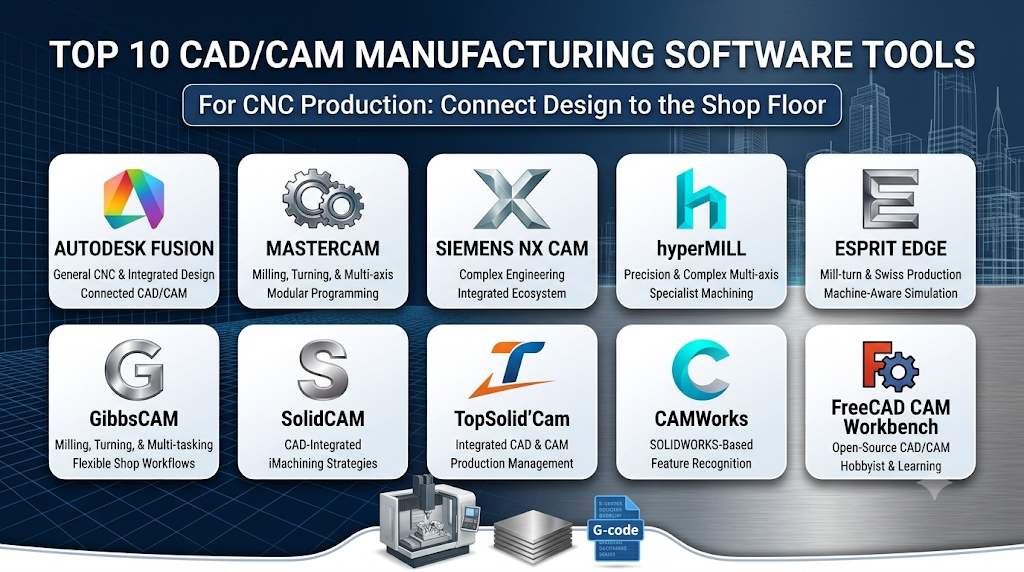
This guide examines ten established CAD/CAM and CAM platforms, including integrated design-to-manufacturing systems, specialist CNC programming applications, and a free open-source alternative. Rather than presenting them as a universal ranking, it explains where each product fits, what it does particularly well, and which limitations buyers should investigate before committing.
What CAD/CAM manufacturing software actually does
Computer-aided design (CAD) software creates digital representations of parts, assemblies, tooling, and other engineered products. Computer-aided manufacturing (CAM) software uses geometry and manufacturing information to prepare those designs for production.
In a typical CNC workflow, the process looks like this:
- Design the component: Create or import a 2D drawing or 3D model.
- Prepare the manufacturing setup: Define the raw material, workholding, machine, coordinate system, and cutting tools.
- Create machining operations: Select milling, turning, drilling, boring, or other appropriate processes.
- Generate toolpaths: Calculate how the cutting tool should move through the material.
- Simulate and verify: Inspect material removal, tool movement, machine motion, and potential collisions where supported.
- Post-process: Convert the CAM system’s internal toolpath information into controller-specific NC code.
- Prove out the program: Validate the program on the actual machine under appropriate shop procedures.
The post-processor is particularly important. Different CNC controllers and machine configurations interpret code differently. A toolpath that looks correct in the CAM application is not automatically safe or suitable for every machine.
CAD/CAM platforms also differ in how closely design and manufacturing are connected. Some maintain associative links between a CAD model and its machining operations, allowing certain design changes to flow into the CAM process. Others specialize in importing geometry and building efficient production programs around it.
Ten CAD/CAM software options worth evaluating
The following products serve different manufacturing environments. Some provide extensive CAD and CAM capabilities in one application, while others focus more heavily on CNC programming. Their order is editorial, not a performance ranking.
1. Autodesk Fusion
Best suited to: Small and medium-sized manufacturers, product developers, machine shops, and teams that want connected CAD and CAM workflows.
Autodesk Fusion combines 3D design and manufacturing tools in one environment. Its Manufacture workspace supports workflows that take a component from design through machining setup, toolpath generation, simulation, and post-processing.
Its manufacturing capabilities cover a range of processes, including milling, turning, drilling, waterjet, laser cutting, and additive manufacturing. More advanced capabilities, such as simultaneous multi-axis machining and additional automation, depend on the selected manufacturing offering and extensions.
This combination makes Fusion attractive to organizations that want to reduce the separation between engineering and production. A design revision can be managed within the same broader environment rather than requiring an entirely separate CAD-to-CAM workflow.
The interface and integrated toolset can also make it useful for businesses that manufacture a mixture of prototypes, fixtures, custom components, and production parts.
Pros
- CAD and CAM capabilities are integrated into one environment.
- Supports a broad range of subtractive and additive manufacturing workflows.
- Toolpath simulation and verification help identify programming issues before machining.
- Useful for product development, prototyping, and general CNC production.
- Offers a connected environment for design and manufacturing data.
Cons
- Advanced manufacturing functions may require additional subscriptions or extensions.
- Complex machine configurations require careful post-processor and simulation validation.
- Cloud-connected workflows may not suit every organization’s IT policies.
- Highly specialized production environments may require more dedicated CAM functionality.
Practical assessment: Fusion is a strong starting point when design flexibility and manufacturing capability matter equally. Before selecting it for demanding production, test the exact machining strategies, machine simulation, and post-processing functions your shop requires. Autodesk’s manufacturing documentation explains its production workflow and supported processes.
2. Mastercam
Best suited to: Dedicated CNC machine shops, production programmers, and manufacturers working across milling, turning, and multi-axis machining.
Mastercam is a specialist CAD/CAM platform with a strong focus on CNC programming. Rather than positioning itself primarily as an all-purpose product-design application, it provides manufacturing-oriented tools for preparing machining operations across different types of CNC equipment.
Its product family includes milling, turning, mill-turn, and other specialized manufacturing capabilities. Depending on the modules selected, programmers can work with conventional milling operations, advanced surface machining, and complex five-axis toolpaths.
A significant consideration is its modular structure. A shop can select capabilities based on its production requirements rather than assuming every installation includes every advanced function.
Mastercam is particularly relevant to businesses where CNC programming is a central daily activity and where programmers need detailed control over machining strategies.
Pros
- Extensive CNC milling and turning capabilities.
- Specialized options for complex multi-axis machining.
- Suitable for a wide range of production environments.
- Established manufacturing-focused product ecosystem.
- Modular product structure allows capabilities to be selected according to shop requirements.
Cons
- Advanced modules can increase the overall software investment.
- Training is important for programmers working with complex machining strategies.
- Machine-specific post-processors require careful configuration and validation.
- Its manufacturing focus may mean some businesses need a separate primary CAD application.
Practical assessment: Mastercam deserves close consideration when the shop’s main requirement is reliable, flexible CNC programming. Evaluate the exact modules required for your machines instead of comparing only the base product offering. Its official product overview describes its milling, lathe, and mill-turn solutions.
3. Siemens NX CAM
Best suited to: Large manufacturers, engineering-intensive organizations, and production teams machining complex components.
Siemens NX CAM is part of the broader NX manufacturing environment. It connects engineering design with manufacturing planning and CNC programming, making it relevant to organizations that manage complicated products and production processes.
Its capabilities extend across prismatic machining, milling, turning, and advanced multi-axis operations. The available functions depend on the selected NX manufacturing configuration.
The platform is particularly interesting where engineering and manufacturing teams need to work with complex 3D geometry and maintain coordination between product design and production preparation.
NX also provides a wider manufacturing ecosystem. Organizations can evaluate how CAM fits alongside other engineering and production-planning processes rather than treating CNC programming as an isolated activity.
That breadth is valuable in sophisticated environments, but it can also introduce implementation and administration demands that smaller shops may not need.
Pros
- Broad CAD and CAM integration within the NX environment.
- Supports complex machining and advanced manufacturing workflows.
- Suitable for engineering-intensive production.
- Scalable manufacturing offerings allow organizations to select different capability levels.
- Can fit into a wider digital manufacturing environment.
Cons
- Implementation and training can be demanding.
- Licensing and configuration require careful evaluation.
- Smaller workshops may find the wider platform unnecessarily complex.
- Machine-specific programming and post-processing still require specialist setup.
Practical assessment: NX CAM is worth evaluating when machining is part of a larger engineering and manufacturing ecosystem. Its capabilities are particularly relevant to complex components and coordinated production processes. Siemens describes its NX manufacturing CAM offerings by capability level, including milling, turning, and multi-axis programming.
4. hyperMILL
Best suited to: Manufacturers producing complex surfaces, precision components, molds, dies, and demanding multi-axis parts.
Developed by OPEN MIND Technologies, hyperMILL is a dedicated CAD/CAM solution known for its focus on sophisticated machining strategies.
Its capabilities include 2.5D, 3D, five-axis milling, turning, and combined machining workflows. It is particularly relevant when component geometry makes tool orientation, collision avoidance, and surface finishing important parts of the programming process.
For example, a manufacturer producing complex aerospace components or precision molds may need more than conventional pocketing and contouring. Tool access, surface quality, machine kinematics, and the order of machining operations can have a significant effect on production.
hyperMILL addresses these challenges through specialized machining strategies and manufacturing automation. Its broader environment also supports integration with other engineering and production processes.
Pros
- Strong emphasis on advanced multi-axis machining.
- Suitable for complex surfaces and precision manufacturing.
- Offers specialized strategies for demanding machining applications.
- Supports combined milling and turning workflows.
- Provides tools for machining automation and process optimization.
Cons
- May be excessive for shops performing only basic two- or three-axis work.
- Advanced strategies require experienced programming knowledge.
- Machine configuration and post-processing need specialist attention.
- Total implementation costs should be evaluated against actual production needs.
Practical assessment: hyperMILL is a compelling candidate when the geometry and machining complexity justify a specialist CAM platform. It should be evaluated using representative difficult components rather than simple demonstration parts. The official hyperMILL platform provides further information about its machining capabilities.
5. ESPRIT EDGE
Best suited to: Precision manufacturers, Swiss-type machining operations, mill-turn production, and shops running complex CNC equipment.
ESPRIT EDGE, developed by Hexagon, focuses on advanced CNC programming and machine-aware manufacturing workflows.
Its capabilities cover milling, turning, mill-turn machining, Swiss-type machining, and wire EDM. This makes it especially relevant to manufacturers operating equipment with multiple axes, spindles, turrets, or synchronized machining channels.
One of its important distinctions is its emphasis on representing machine kinematics and constraints during programming and simulation. This matters because complex CNC equipment cannot be evaluated solely by looking at the cutting tool’s path relative to the part. The machine’s actual movements, tooling arrangement, and potential interference must also be considered.
ESPRIT EDGE also includes automation features and digital-twin-oriented simulation capabilities. These are intended to help programmers validate machining operations before transferring programs to production equipment.
Pros
- Strong support for complex mill-turn and Swiss-type machining.
- Machine-aware simulation and kinematic considerations.
- Covers milling, turning, and wire EDM workflows.
- Automation features can help standardize recurring programming tasks.
- Suitable for manufacturers with demanding CNC equipment.
Cons
- Advanced capabilities may be unnecessary for conventional machining shops.
- Accurate machine models and configuration require preparation.
- Specialized training is important for complex production workflows.
- The full system’s value depends on the actual machine tools and modules in use.
Practical assessment: ESPRIT EDGE deserves attention when the production challenge involves complex machine behavior rather than simply generating a conventional milling toolpath. Its official product information outlines its machining and simulation capabilities.
6. GibbsCAM
Best suited to: Machine shops working with milling, turning, mill-turn centers, and specialized CNC production.
GibbsCAM is a manufacturing-oriented CAM system designed to support a wide range of CNC programming requirements.
Its product offerings include milling, turning, mill-turn, multi-task machining, Swiss machining, and wire EDM options. Different packages provide different levels of capability, allowing manufacturers to select a configuration that reflects their current production requirements.
A notable aspect of GibbsCAM is its attention to shop-floor machining workflows. Its programming environment supports both imported geometry and geometry created within the application. Depending on the package, users can work with solid models, machine simulation, and more advanced machining functions.
Its mill-turn and multi-task machining capabilities are particularly relevant to shops that need to coordinate several cutting operations on sophisticated machines.
Pros
- Covers milling, turning, and combined mill-turn programming.
- Offers specialized options for multi-task and Swiss-type machining.
- Supports wire EDM workflows through dedicated options.
- Modular packages accommodate different manufacturing requirements.
- Provides simulation and toolpath visualization capabilities in applicable packages.
Cons
- Advanced machining functions require appropriate modules.
- Package selection can be difficult without a clear machine and process inventory.
- Post-processors must be configured for the actual CNC equipment.
- Organizations may need separate CAD software for broader engineering design.
Practical assessment: GibbsCAM is worth considering when a shop wants a dedicated CAM environment with a range of machining options. Compare the relevant package levels against your actual machines, particularly if you require multi-channel or mill-turn programming. The GibbsCAM product information describes its CNC machining coverage.
7. SolidCAM
Best suited to: Manufacturers using SOLIDWORKS, Solid Edge, or Autodesk Inventor as their primary design environment.
SolidCAM is a CAM platform designed to integrate closely with established mechanical CAD applications. Its approach is especially useful for organizations that want to define machining operations without moving repeatedly between separate design and manufacturing environments.
One of its best-known technologies is iMachining, which uses machining strategies and calculated cutting conditions to manage tool engagement and material removal. Its purpose is to help programmers create efficient toolpaths while accounting for the cutting tool, work material, and machine conditions.
SolidCAM also offers modules for 2.5D and 3D milling, high-speed machining, turning, mill-turn, Swiss machining, and simultaneous five-axis machining.
Its integration model is an important buying consideration. Teams already working in a supported CAD environment may benefit from keeping design and manufacturing operations closely connected.
Pros
- Integrates with supported mechanical CAD environments.
- iMachining provides specialized high-efficiency milling strategies.
- Offers a broad range of milling, turning, and multi-axis modules.
- Supports mill-turn and Swiss machining workflows.
- Associative CAD/CAM workflows can help manage design revisions.
Cons
- The integrated approach makes supported CAD platforms an important dependency.
- Advanced functions require appropriate modules and configuration.
- Users may need training to make effective use of specialized toolpaths.
- Machine simulation and post-processing still need to be validated for the target equipment.
Practical assessment: SolidCAM is particularly attractive when a business already uses a supported CAD platform and wants to keep manufacturing programming closely connected to design. Its iMachining documentation explains the technology, while its module documentation describes its wider machining capabilities.
8. TopSolid’Cam
Best suited to: Manufacturers seeking an integrated CAD/CAM environment with machining, tooling, and production-process management.
TopSolid’Cam is part of the TopSolid software ecosystem, which brings together design, manufacturing, and related engineering applications.
Its CAD/CAM integration is central to the product. Design and manufacturing operations can be managed within the same parametric and associative environment, helping teams maintain connections between the model and its machining operations.
The platform supports 2D, 3D, four-axis, and five-axis milling, as well as turning, mill-turn, and Swiss-type machining capabilities. It also provides tools for managing machining environments, fixtures, cutting tools, and machine configurations.
This makes TopSolid’Cam particularly interesting to manufacturers that want more than a standalone toolpath generator. Its wider ecosystem can help connect machining preparation with other production-related activities.
Pros
- Integrated CAD and CAM environment.
- Supports milling, turning, and multi-axis machining.
- Includes tools for managing machines, fixtures, and cutting tools.
- Offers machining simulation and collision-management capabilities.
- Supports reusable machining methods and automation.
Cons
- Its broader ecosystem may require a significant implementation commitment.
- Teams using another established CAD platform should evaluate data exchange carefully.
- Advanced machining configurations need specialist setup.
- Training and workflow adaptation may be necessary.
Practical assessment: TopSolid’Cam is worth considering when a manufacturer wants design, machining preparation, and related engineering processes within one connected environment. Its official product overview explains its approach to integration, machining, and simulation.
9. CAMWorks
Best suited to: SOLIDWORKS-based manufacturers seeking automated machining preparation and associative CAD/CAM workflows.
CAMWorks is a CAM solution closely integrated with SOLIDWORKS. It focuses on connecting part geometry with machining operations through feature recognition, reusable machining knowledge, and automated programming workflows.
Its Automatic Feature Recognition and Interactive Feature Recognition capabilities help identify machinable geometry and translate it into manufacturing operations. This can be useful when a shop repeatedly produces components with familiar features such as holes, pockets, and slots.
CAMWorks also offers modules for milling, turning, multi-axis machining, mill-turn, wire EDM, nesting, and virtual machine simulation.
Its knowledge-based machining approach is particularly relevant to manufacturers trying to standardize programming methods across teams. Instead of rebuilding every machining process from scratch, organizations can develop rules and machining practices that programmers reuse.
Pros
- Close integration with SOLIDWORKS.
- Supports automatic and interactive feature recognition.
- Knowledge-based machining can standardize recurring programming work.
- Associative workflows help manage certain design changes.
- Offers additional modules for advanced machining and simulation.
Cons
- Its SOLIDWORKS-centered workflow may not suit organizations using other primary CAD systems.
- Advanced capabilities depend on the selected product configuration.
- Feature recognition does not eliminate the need for programmer review.
- Complex machine programming still requires suitable post-processors and validation.
Practical assessment: CAMWorks is a strong candidate for businesses already invested in SOLIDWORKS that want manufacturing preparation integrated into their design process. Evaluate its feature recognition using real production components, especially parts with nonstandard geometry or complicated machining requirements. The CAMWorks product overview describes its integration and manufacturing modules.
10. FreeCAD CAM Workbench
Best suited to: Hobbyists, engineering learners, small workshops, and technically confident users looking for an open-source CNC programming option.
FreeCAD is an open-source parametric CAD application with a CAM Workbench used to prepare CNC machining operations.
Its CAM workflow starts with a model created in FreeCAD or imported from another supported geometry source. Users create a machining job, define stock and tools, select operations, generate toolpaths, and export machine instructions using an appropriate post-processor.
The project provides common milling operations such as contouring and pocketing, along with tool management, simulation, and post-processing functionality.
Its open-source nature makes it different from the commercial systems in this list. Users can inspect and modify the application, participate in the development community, and avoid a conventional commercial CAM subscription.
However, open-source availability should not be confused with a ready-made production solution for every machine. Post-processor configuration, tool definitions, machining parameters, and program verification remain the user’s responsibility.
Pros
- Free and open-source software.
- Includes CAD and CAM functionality in one application.
- Supports CNC toolpath generation and post-processing.
- Provides access to project development and community resources.
- Useful for learning, experimentation, and simpler machining workflows.
Cons
- Advanced production capabilities may be more limited than specialist commercial CAM platforms.
- Setup and configuration can require technical knowledge.
- Machine-specific post-processors need careful validation.
- Professional support and implementation services differ from commercial vendor arrangements.
- Complex multi-axis production may require a more specialized system.
Practical assessment: FreeCAD is a useful option for learning CAD/CAM concepts and preparing suitable CNC jobs without purchasing a commercial license. For production use, validate the complete workflow on the target machine before relying on generated programs. The FreeCAD CAM Workbench documentation explains its job, operation, and post-processing workflow.
Comparing the ten platforms
The table below summarizes their primary roles. It is intended to narrow the shortlist, not to suggest that every product has identical functionality or that every advanced feature is included in its base offering.
| Software | Main manufacturing focus | Notable distinction | Important consideration |
|---|---|---|---|
| Autodesk Fusion | General CNC, additive, and integrated design | Connected CAD/CAM environment | Advanced functions may require extensions |
| Mastercam | Milling, turning, and multi-axis CNC | Dedicated manufacturing programming ecosystem | Modular capability and licensing |
| Siemens NX CAM | Complex engineering and production | Broad integrated manufacturing environment | Implementation and training demands |
| hyperMILL | Precision and complex multi-axis machining | Specialized advanced machining strategies | Best value when machining complexity justifies it |
| ESPRIT EDGE | Mill-turn, Swiss, milling, and turning | Machine-aware programming and simulation | Requires accurate machine configuration |
| GibbsCAM | Milling, turning, and multi-task machining | Flexible packages for different CNC workflows | Select the correct package and options |
| SolidCAM | CAD-integrated CNC programming | iMachining and supported CAD integration | Dependence on supported CAD platforms |
| TopSolid’Cam | Integrated design and manufacturing | Connected CAD/CAM and production environment | Broader ecosystem commitment |
| CAMWorks | SOLIDWORKS-based CNC programming | Feature recognition and knowledge-based machining | Strongest fit within its CAD ecosystem |
| FreeCAD CAM Workbench | General-purpose, accessible CNC programming | Open-source CAD/CAM workflow | More hands-on configuration and validation |
Pros and cons of using CAD/CAM manufacturing software
CAD/CAM software can improve manufacturing preparation, but its value depends on how well it fits the machines, people, and production processes involved.
Advantages
1. More consistent CNC programming
Reusable operations, templates, tool libraries, and machining rules can help standardize programming practices. This is especially useful when multiple programmers produce similar parts.
2. Better design-to-production coordination
Integrated CAD/CAM systems can reduce unnecessary file transfers and help manage design changes. Associative workflows can make certain model revisions easier to propagate into manufacturing operations.
3. Improved visibility before machining
Toolpath simulation and machine simulation can reveal potential problems before a program reaches the shop floor. Depending on the system, users can inspect stock removal, tool movement, and machine kinematics.
4. Support for complex geometry
Advanced CAM systems make it possible to program components that would be difficult to machine efficiently using conventional manual programming methods.
5. Reusable manufacturing knowledge
Tool libraries, machining templates, and feature-based programming can help organizations preserve process knowledge and reduce repetitive preparation work.
Disadvantages
1. Software investment can be substantial
Licensing is only one part of the cost. Training, post-processors, machine models, implementation, support, and ongoing maintenance can increase the total investment.
2. Programming still requires manufacturing expertise
CAM software does not automatically understand every real-world condition. Programmers must account for material behavior, tool limitations, fixtures, cutting parameters, machine constraints, and production requirements.
3. Incorrect post-processing can create serious problems
The post-processor translates internal toolpath data into instructions for a specific CNC controller and machine configuration. Incorrect output can cause unexpected movement or unsafe machining.
4. Advanced features introduce complexity
Five-axis machining, mill-turn programming, and multi-channel operations require more preparation and specialist knowledge than straightforward three-axis work.
5. Simulation is not a substitute for production validation
A simulation can only be as reliable as its geometry, machine model, tooling data, and configuration. Real-world conditions must still be checked through appropriate prove-out procedures.
How to choose the right CAD/CAM system for your manufacturing operation
Comparing feature lists is a poor substitute for evaluating actual production requirements. A useful selection process begins with the machine shop rather than the software brochure.
Start with your CNC machines
Document the equipment you intend to program.
Include:
- CNC milling machines and their axis configurations.
- CNC lathes and turning centers.
- Mill-turn machines.
- Swiss-type machines.
- Wire EDM equipment.
- Machine controllers and their configurations.
- Auxiliary equipment, rotary tables, probes, and other relevant accessories.
A system that supports five-axis machining in general terms may not support the specific kinematics and operating requirements of your machine. Ask the vendor to demonstrate your machine configuration, not a similar-looking generic model.
Match the software to your part complexity
Different parts require different machining approaches.
| Part or production requirement | Capabilities to investigate |
|---|---|
| Simple brackets and plates | 2.5D milling, drilling, contouring |
| Complex housings | 3D machining, rest machining, simulation |
| Mold and die components | Surface finishing, multi-axis strategies |
| Aerospace-style components | Advanced five-axis machining and machine simulation |
| Turned precision components | Turning cycles, tooling, stock management |
| Mill-turn production | Multi-channel programming and synchronization |
| Swiss-type production | Swiss machine configuration and specialized toolpaths |
| Repeated production parts | Templates, automation, reusable machining knowledge |
The objective is not to buy the most advanced system available. It is to obtain the capabilities that your parts and machines genuinely require.
Check CAD compatibility and data exchange
If your engineering department already uses a CAD platform, determine how the CAM system handles that data.
Important questions include:
- Does it work directly with your native CAD files?
- Are model revisions reflected in associated machining operations?
- Does importing neutral geometry preserve the information needed for machining?
- Can the system handle large assemblies and complex surfaces?
- Are drawing information, tolerances, and product manufacturing information available where required?
Integrated CAD/CAM can simplify change management, but a separate specialist CAM application may still be preferable when advanced machining capabilities are more important than maintaining one design environment.
Evaluate post-processors before purchasing
Post-processing should be a central part of the software evaluation, not a final implementation detail.
Ask the vendor or reseller:
- Is a post-processor available for the exact machine and controller?
- Does it support the required axes, spindles, turrets, and auxiliary functions?
- Can it produce the expected tool-change and machine-control commands?
- Who maintains and modifies the post-processor?
- How are changes tested after software, controller, or machine updates?
Request a sample program for a representative part and review it with the people responsible for CNC operation.
Never assume that a generic post-processor is production-ready simply because it generates valid-looking G-code.
Consider the total cost of ownership
A realistic budget should include more than the initial license.
Consider:
- Software subscriptions or perpetual licenses.
- Advanced modules and extensions.
- Post-processor development and maintenance.
- Machine simulation packages.
- Training and onboarding.
- Technical support.
- CAD interoperability tools.
- Hardware and IT requirements.
- Data management and backup.
- Future upgrades and additional machine licenses.
For a small workshop, a simpler system may offer better value than an enterprise platform with capabilities that remain unused. Conversely, a manufacturer running complex machines may find that specialist simulation and automation justify a higher investment.
Common mistakes when selecting CAD/CAM software
Even technically capable manufacturers can make avoidable purchasing decisions.
Choosing software based only on the feature list: A long list of supported processes does not prove that the application can handle your exact machine, controller, tooling, or part geometry.
Ignoring the post-processor: A CAM system is only useful when it produces correct machine instructions for the equipment in production.
Underestimating training: A powerful application can become an expensive underused asset if programmers are not trained to use its capabilities.
Buying advanced machining modules too early: Five-axis and multi-task machining options should be justified by real production requirements.
Failing to test design revisions: If your products change frequently, test how the software handles updated CAD models and existing machining operations.
Treating simulation as a guarantee: Virtual verification reduces risk, but it cannot replace correct setup, machine checks, and controlled production prove-out.
Ignoring data management: Tool libraries, post-processors, templates, and machine configurations should be controlled and backed up. Poor management can undermine even a capable CAM system.
A practical evaluation process before committing
A short, structured pilot is more useful than a generic vendor presentation.
Select two or three shortlisted products and give each vendor the same representative manufacturing tasks.
A useful pilot should include:
- A typical production component: Test the everyday programming workflow, not just an impressive demonstration part.
- A difficult component: Include the geometry or machining operation that creates the greatest programming challenge.
- A design revision: Change a feature and observe how the CAM application handles the updated model.
- A machine-specific post-process: Generate output for the actual controller and machine configuration.
- A simulation review: Check tool, holder, fixture, stock, and machine movement where supported.
- A programmer assessment: Ask the people who will use the application to evaluate its workflow and learning demands.
- A support assessment: Confirm how post-processors, training, and technical problems will be handled after implementation.
Record the time required for programming, the amount of manual intervention, the quality of simulation, and the effort needed to prepare machine-ready output. These observations provide a more meaningful comparison than an arbitrary software score.
Final thoughts
The most suitable CAD/CAM manufacturing software depends on the relationship between your engineering workflow and the machines producing your parts.
Autodesk Fusion is a practical option for organizations seeking connected design and manufacturing capabilities. Mastercam, GibbsCAM, and SolidCAM are worth examining for dedicated CNC programming requirements. Siemens NX CAM and hyperMILL deserve attention when complex engineering geometry and advanced machining strategies are central to production. ESPRIT EDGE is particularly relevant to sophisticated mill-turn and Swiss-type operations, while TopSolid’Cam and CAMWorks offer distinct approaches to integrated manufacturing workflows. FreeCAD provides an accessible open-source alternative for suitable jobs and technically confident users.
Before making a decision, test the software with your own parts, machine configurations, and post-processors. Confirm how it handles design changes, simulation, production data, and programmer training.
A successful CAD/CAM investment is not the system with the longest feature list. It is the one that reliably turns your engineering designs into safe, repeatable, machine-ready production processes.